Learn by doing
A little guidance. More time making music.
Start with something you want to do today. Each guide explains the controls as you need them, gives you a small task to try and helps you keep the result. You can use the creative tools without an account. The optional AI assistant has separate access requirements.
Keep an editable copy before trying unfamiliar controls. Work on a duplicate so you can compare the result and return to your original.
Use learning routes by age, interest and goal to find four-week offline parent plans, instrument-discovery ideas, production and DJ pathways, and the exact short-course titles to search for. Prefer to watch first? Try the three recorded course demonstrations with visible captions and written steps.
Start with an activity you can do together, even if you do not read music. These guides separate offline activities from app access. A course age label does not change account eligibility; under-13 accounts are unavailable.
- Help your child start music when you are not musical: choose one rhythm, tune or word activity.
- Make a first song together: invent a line, repeat it and choose a new ending.
- Choose a music-learning route: explore interests in instruments, singing, songwriting and production.
- Music activities by age: adapt the activity to the learner.
- Understand family access and controls: check eligibility and the setup offered by the service.
- Make background music for a video: plan a short cue and check the music against the actual narration.
- Share a song demo with bandmates: prepare a reference mix and choose the files your bandmates need.
- Write a song as a personal gift: turn one shared detail into a short, singable idea.
- Plan music activities for learning at home: prepare adult-led, offline pulse and pattern activities.
Choose one activity, use the prompts and keep a note on paper. Each pack includes rhythm, melody and songwriting. The age bands are flexible starting points and do not change app eligibility. No child account is needed for the offline activities.
- Ages 5-7: copy, choose and play: three offline activities and a practice record.
- Ages 8-10: change one thing: three offline activities and a practice record.
- Ages 11-13: compare two versions: three offline activities and a practice record.
- Ages 14-17: make a choice and explain it: three offline activities and a practice record.
- Finish a short demo from one loop: make one contrast, check the export and keep an editable copy.
- Organise a DJ library: use two tags and one rule-based playlist.
- Compare DJ cues, loops and beat jump: try each control separately on one track.
- Plan hot cues and memory cues: mark three useful places and check what the buttons do.
- Compare two song versions: keep both copies and change one detail.
- Ask for music feedback: give a goal, a passage and one question.
Open Hearhood and choose Short courses. Try lyrics, beats, melody, chords, arranging, timing, mixing, EQ, recording preparation or DJ blending in a separate practice space. Filter by topic or progress and resume an unfinished lesson. The explanations use plain English, sound is optional, and a quick check follows the exercises. Practice notes and course progress stay in this browser.
For a next step in the real app, learn to share a beat and make a credited remix or manage your account and community preferences.
Choose a guide for the result you want to make, then return to a learning route when you want to practise one skill.
These walkthroughs start with a situation you might recognise. Pick the one that sounds like where you are today.
There is a song in your head
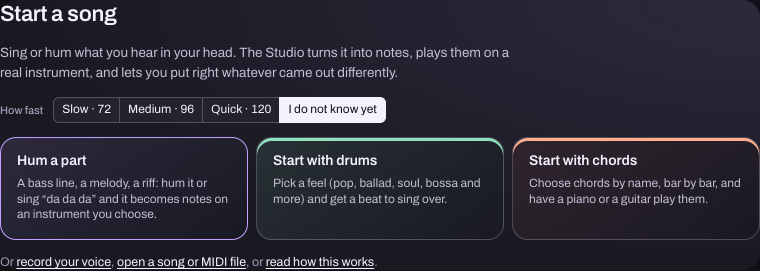
Hum a part, hear it on an instrument, then build a song around it with chords, drums and your voice.
Your loop needs somewhere to go
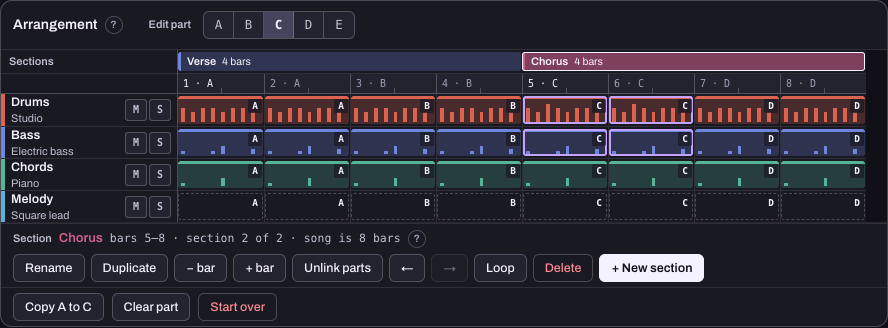
The same four bars keep going round. Give them a second section and make the chorus different without changing the verse.
You know a few chords
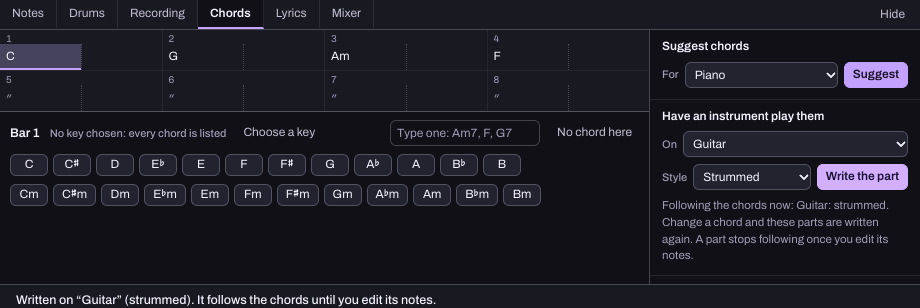
You want a backing to sing or write over. Enter chord names and have an instrument play an editable part.
Your chorus feels too high
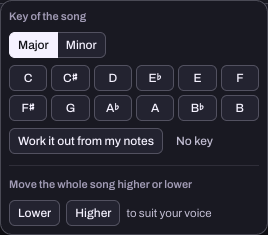
Try moving the Studio's notes and chords together, then compare the same phrase in a different key.
The beat works, but the sound does not
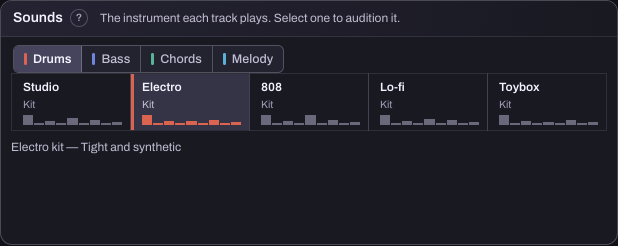
Keep the rhythm steady while comparing kits and instruments. Find out whether the sound was what needed changing.
Your first DJ set needs a plan
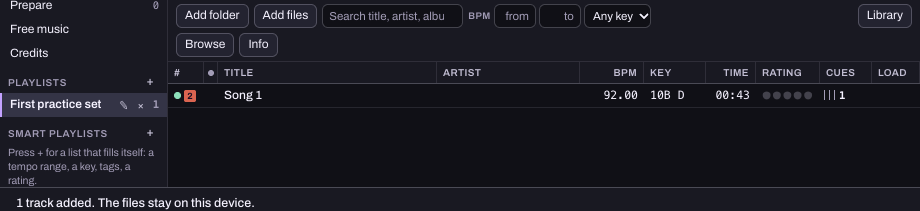
You have tracks but keep searching instead of practising. Make a shortlist, mark a starting cue and rehearse one join.
Record your first vocal
Set up a Voice track, check a short take and keep the actual recording with your song.
Make a first mix
Compare original audio examples, balance the parts and try one small change in the Songwriter mixer.
Your voice sounds late
Separate delayed monitoring from an out-of-time take, then check the right part of your setup.
Hear the next DJ track privately
Understand headphone cue, split output and what four-channel routing needs from your device.
Your melody's rhythm sounds wrong
Separate when a note starts from how long it lasts. Work on one pitch before adding the tune's shape.
Learning production feels overwhelming
Try three short sessions with one question, a saved version and a small result you can return to.
You rely on the waveform to spot changes
Practise predicting a phrase change in one familiar track, then check what you actually heard.
Make your first beat
Build a drum pattern, add a bass idea and hear what changes when you leave a little space.
Practise DJ mixing
Bring in your music, find your way around two decks and practise a simple crossfade on a computer.
Turn a lyric into a song idea
Write a short verse in the Studio, add a backing beat and keep an editable copy.
Use AI with a clear intention
Ask for one useful next step, protect the parts you like and decide what to keep yourself.
Save, export or move your work
Choose the right file for listening, editing later or moving to another browser.
Get sound working
Check playback, the output and the mixer in a sensible order without starting your project again.
Check your DJ controller
Already a DJ? A twenty-minute test from plugging in to one transition, ending in a report that says what worked on your unit.
What do people mean when they talk about AI in music? Read why artists are concerned about AI for the questions about consent, income and creative control, with research sources and practical checks before choosing a tool.
See Hearhood vs BandLab for starting, learning and saving differences.
The getting started guide helps you choose a workspace. You do not need a controller to begin. For DJ practice, a computer gives you the full two-deck layout used in the guide; the phone layout is different.
These guides cover the creative-tools beta. Member pages and playable Produce song links are available. Recorded-audio uploads have a separate workflow where enabled; check its availability and visibility rules before using it. A licensed commercial-song catalogue, listener subscriptions, artist payments and live shows remain plans.
These guides explain the current controls and their limits. Their captions distinguish orientation views and empty states from actions or hardware tests.
Listening and making together
- Discover music made in Hearhood.
- Save songs into Hearhood collections.
- Start a song from a Hearhood groove.
- Join a Hearhood weekly music challenge.
- Give useful feedback on a shared song.
- Find a music collaborator on Hearhood.
Deeper DJ practice
- Use the DJ sampler without crowding your mix.
- Use Hearhood automix as a practice tool.
- Use imported stems in the Hearhood DJ workspace.
- Use DJ effects without hiding the music.
- Practise four-deck mixing in Hearhood.
- Move DJ library information between Hearhood and rekordbox.
Songwriting and recording
- Use a MIDI keyboard with Hearhood Songwriter.
- Record and compare vocal takes in Hearhood.
- Export separate song tracks for another music maker.
- Use drum feels, fills and variations in Songwriter.
- Understand swing and humanise in a drum pattern.
Your device and account
- Upload your own recording: check availability, permission and when a track becomes publicly listed.
- Choose between an audio recording and an editable song link: understand what a listener or collaborator receives.
- Find music events: check listings and confirm details with the organiser.
- Understand event and ticket links: distinguish information and external links from a purchase.
- Begin met een groove: verander één ding en luister naar het verschil.
- Geef bruikbare muziekfeedback: benoem een moment en stel een duidelijke vraag.
- Zoek een medemaker: beschrijf één muzikale taak waarvoor je hulp zoekt.
Guides with screenshots identify their app version and screen layout in the screenshot note. The caption identifies what each image demonstrates. The screenshots were refreshed on 24 and 25 October 2026 to show the current design. The captions identify computer close-ups and compact phone layouts. They are real app captures, cropped where a closer view helps. Button positions can change with screen size and later updates. Open Workspace to check you are in the right area, then use Find or the nearby ? explanation. If a step still does not work, tell us what happened.
- Why do my lyrics sound awkward when I sing them? Compare two drafts over the same tune.
- What should I write in the second verse? Move the story forward without starting again.
- Why is the mix out of time at the same BPM? Separate speed, beat position and phrasing.
- How do I stop two vocals clashing? Practise a clearer handover with cues and a shorter overlap.
- Practice files and short walkthroughs: one downloadable pack, six captioned videos and written steps.
- Hear one mix change: compare the same original phrase with one controlled change.
- Understand speed, pitch and key lock: reference examples and the real DJ controls.
- Recover missing DJ files: reconnect audio and keep cues and playlists separate from the files.
- Check permission and credit: understand what naming a maker does and what needs permission.
- Choose a device and browser: find a setup that suits the task.
The app offers short courses with listening, practice, planning, writing and decision exercises for music-making, community, DJ and account use cases. These activities do not post messages, operate equipment or change your account. Follow the linked guides to try the actual features.