How to help your child start music when you are not musical
You do not need to read music to explore it with your child. Start with something you can both hear: a steady clap, a short tune or a made-up line. Let your child make one choice, repeat the idea together and finish by asking what they would like to try next.
This guide is for parents who want a manageable first activity. You do not need to buy an instrument, make a recording or share anything online to try the examples below.
Start with what your child already enjoys
Ask, “Which bit would you like to try?” Offer two choices rather than a whole music course. A child who taps along to songs might choose rhythm. Someone who invents stories might enjoy lyrics. A child who changes how a tune sounds might want to explore notes or sounds.
Those choices are starting points, not labels. Enjoying drums today does not mean choosing drums forever.
Try one activity together
Choose one of these examples. A few minutes is a suggested starting point, not an age-based attention rule.
- Copy a rhythm: tap a slow, comfortable pulse. Make a short clap pattern over it and take turns copying each other.
- Make a tiny tune: hum a short phrase, then repeat it with one note higher or lower. Ask which version your child prefers.
- Invent a lyric: finish “My imaginary pet can…” with something silly. Speak the line twice, then change its rhythm.
If clapping or singing is uncomfortable or inaccessible, choose another response: say “tap,” point at a beat card or describe the change you hear. The activity does not need every kind of movement or sound.
Listening, making and discussing music can belong in the same activity. England’s music programmes of study include listening, performing and composing. That is a useful broad reference, not evidence that this exercise is an assessed curriculum programme.
Ask questions you can answer together
You do not have to decide whether something is “proper music.” Ask a question about a choice:
- “What did you change?”
- “Would you like the ending to repeat or surprise us?”
- “Shall we keep this version or try another?”
If you cannot hear the difference, say so. Ask your child to show it again. You can participate without pretending to be a teacher.
Choose a next step by interest
After the activity, write one sentence: “Next time we want to…” It might be trying a beat, singing the same line differently or hearing a real keyboard. Repeating an enjoyable activity is a valid next step; there is no need to unlock a harder task each time.
For a complete activity, try making a first song together. To compare interests, read choosing a music-learning route.
For more starting points, see music activities by age. Treat the age bands as suggestions and adjust to the learner. For a child interested in words, the beginner lyric-writing guide offers a separate route into songwriting.
Where Hearhood can fit
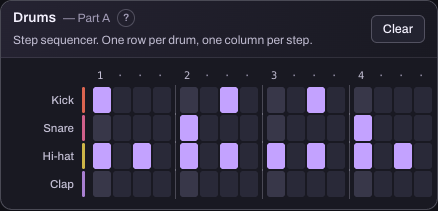
This reference capture shows how a screen beat pattern is laid out. It is an optional next step for an eligible learner, not a requirement for the offline rhythm activity above. This guide does not ask a child to create an account to try the exercise.
Hearhood has browser music-making tools and beginner guides. For an eligible learner, getting started explains the available routes. Check the current access rules and controls before involving a child in an app activity.
Under-13 accounts are not available. The offline activities on this page do not need a child account. A lesson’s age label does not grant access, and sharing an adult’s password is not a substitute for supervised setup. Read the family access guide and follow the current terms and choices shown in the service.
A screen activity can introduce musical ideas, but it cannot check posture, hand position or other physical instrument technique. If your child wants to learn an instrument, a teacher can help with that next step.
Common parent questions
Do I need to know music theory? No theory is needed for the clap, tune and word activities here. You are helping your child listen, choose and try again.
Do we need an instrument? No. These first activities use voices, words or a comfortable way of marking a beat. Learning a physical instrument is a separate step.
Does my child need to perform for anyone? No. You can keep the activity between you. Recording and public sharing are optional, separate decisions.
About this guide
Prepared for Hearhood, a music app by Scopra, with AI assistance. These are practical activity suggestions, not a teacher-assessed lesson plan or a claim about learning outcomes. Read about Hearhood for the service’s purpose and operator.