A sound-choice story
The rhythm works. The sound does not feel right yet.
You have a beat you keep coming back to, but something about it feels off. The kick is softer than you imagined, or the whole kit feels too natural for the electronic idea in your head. You start moving hits around, then realise you liked the rhythm before.
In Hearhood's Produce workspace, the Sounds card lets you change the instrument playing a part without rewriting its notes or drum steps. Choose Drums, then a kit such as Studio or Electro. You can compare the same pattern through different sounds and decide whether the sound was what needed changing.
This exercise keeps the rhythm and tempo steady. Your result is a sound choice you can explain, or a clear description of what the available sounds are missing.
1. Keep a copy of the beat you like
Open Workspace › Produce, then Make. If this is your first visit, choose Make a beat in the starting panel. The first beat guide explains the drum grid if you need a starting pattern.
For an existing idea you want to preserve, use My songs › Backup › Download this song before experimenting. This gives you an editable file outside the browser. Return to Make when you are ready.
2. Listen to a short, familiar part
Press Play and listen to the pattern once. Choose one thing you want to compare: the body of the kick, the sharpness of the snare or the space around the hi-hat.
Leave the tempo and grid alone for this exercise. If the arrangement has several sections, use the section Loop control to repeat the one you are comparing. Turn it off when you want to hear the whole arrangement again.
You do not need to find technical words for the difference. “I want this to feel tighter” is a useful intention. So is “I like the rhythm, but the kit feels too soft.”
3. Choose another kit in Sounds
Scroll to the Sounds card in Make. Choose the Drums tab. The available kit buttons include Studio, Electro, 808, Lo-fi and Toybox. Select Electro to try it with the same rhythm.
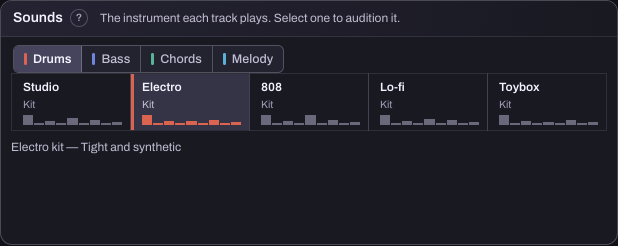
This selection changes the drum sound for the song, including other sections that use that drum track. It is not a way to change only the chorus's kit. The pattern steps stay in place, so keep listening for the sound rather than expecting a new rhythm.
4. Compare two choices before trying everything
Switch back to Studio, then try Electro again. Use the same short section for both. Does one support the idea better? Does a louder or brighter sound attract your attention without actually fitting the song?
Keep your device volume comfortable. If you need to check the drum level against the rest of the music, use the Mix area. Try to separate that balance decision from the choice of kit.
If neither sound works, write down what you are missing before selecting a third. That observation is useful creative direction. You might want a shorter kick, a less busy high end or a kit closer to the style you make.
5. Try the same question with another layer
The Sounds card also has Bass, Chords and Melody tabs. Choose one when you want a different instrument for that layer, then compare it against the same notes. Change one layer at a time so you can hear what caused the difference.
These are the built-in Produce sound choices. Selecting a kit does not import a sample pack or open a detailed sound-design editor. If you want a sound the tool does not offer, that is useful feedback rather than a reason to keep rewriting a pattern you already like.
6. Keep the choice and the reason behind it
Save an editable song-file copy of the version you want. Export a WAV too if you want to listen outside the app. The saving guide explains both choices.
If you are testing Hearhood, three observations are especially helpful: which sound you tried, what you were trying to achieve, and what stopped you getting there. “Electro kept the groove but I wanted a shorter kick” says much more than “needs better sounds.”
You have made progress when you know why a sound fits, or can describe the missing option clearly. The next step might be another instrument, a balance change or simply leaving the beat alone.