Move your DJ library information carefully
A DJ library contains information about music files: playlists, cue points, grids and other details. Moving that information is different from copying the audio. Hearhood can bring in supported rekordbox library data and export rekordbox XML; it does not write a rekordbox USB stick for you.
Keep the original library and music safe
Before trying a transfer, keep your existing library and audio files in their original locations. Use a small test playlist first, with two tracks whose cues you know. This makes it easier to notice a missing file or a changed grid.
Do not format a USB stick or remove an existing library as part of this exercise. You should be able to return to your starting setup.
Bring supported library information into Hearhood
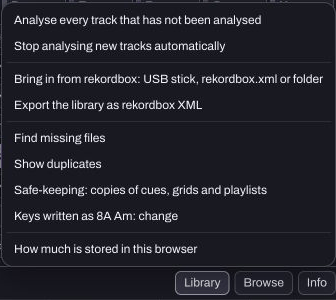
Open the DJ Library's rekordbox import controls and choose the supported source offered there, such as XML or a supported USB-export library. Follow the app's file or folder picker. Confirm that the tracks and playlist appear, then locate the actual audio if the library information does not provide accessible files.
A changing-tempo grid imported from rekordbox can preserve its segments. Hearhood's own automatic analysis estimates one tempo, so those are different sources of beat-grid information.
Export XML when you want to move information back
Use Library and Export the library as rekordbox XML. The export includes supported grids, hot cues, memory cues, loops, ratings, colours, labels, comments and playlists. It does not pack the original music files inside the XML.
The exported paths are relative to the folders you added because a browser is not told every full disk path. The receiving program may ask you to relocate files. Refer to the official rekordbox manuals for your installed version's import controls; menu locations can change.
Check the result before relying on it
Open the test playlist in the receiving program. Play each file, visit its cues and check an early and a late passage against the grid. Count the playlist entries. A successful file download alone is not proof of a complete musical transfer.
Keep your Hearhood editable backups and original audio separately. The file-format guide explains why library metadata, MIDI and audio are not interchangeable.