A learning routine story
You want to make music. There is too much to learn at once.
You open a music tool intending to make something small. Twenty minutes later, you are comparing sounds, searching for a tutorial and wondering whether you should learn mixing before writing another note. The session ends without a result you can return to.
Try three short practice sessions with one question each: make a small idea, change one thing, then listen again and keep a copy. Hearhood's creative tools let you work without an account or AI access. In Songwriter, named versions can preserve stages of the same song while you experiment.
Twenty minutes per session is a suggested starting point, not a target you have to meet. Space the sessions around your life. This is a way to reduce the number of decisions, not a promise that you will learn production on a fixed schedule.
Session 1: choose one question and make a tiny idea
Pick a question you can answer by listening. “Can I put this short melody in time?” is more manageable than “Can I learn production?” “Does this backing leave room for my words?” is more useful than “Can I finish an album?”
Choose one starting exercise:
- Make your first beat if rhythm interests you.
- Enter a short melody by hand if timing is the sticking point.
- Make a backing from chords if you already have chord names.
- Start with a few lyric lines if words come first.
Stay with one exercise. A short rhythm, four melody notes or a few lines over a backing is enough for the first session. If a control blocks you, look up that specific step, try it, then return to the idea. You do not have to finish a whole tutorial before making anything.
Keep a version before experimenting
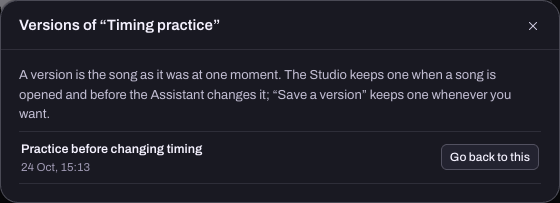
If you are working in Songwriter, use Save a version before changing the idea. In the compact layout, open the top-right More for this song menu. On a computer, open the song menu at the top left. Choose Save a version, give it a descriptive name and confirm.
“Practice 1 - timing” says more than “final final.” Open Versions in the same menu to see the saved stage. Go back to this restores that stage to the current song, so keep a version of the current state before restoring an older one you may want to compare.
Produce has different save controls. If you chose the beat exercise there, use My songs › Backup › Download this song to preserve a separate editable copy before changing it. The saving guide explains the distinction.
Session 2: change one thing and compare
Return to the same idea. Choose one change that answers your question. Move a melody note earlier, remove a busy drum hit, or change one chord. Avoid changing the rhythm, sound and tempo together, because then it is harder to tell which change helped.
Listen before and after. You do not need a technical explanation. “There is more room for the words” or “I preferred the original rhythm” is a useful finding. Save another version or song-file copy if you want to keep the experiment.
If the question is about arrangement, try a second section rather than adding more instruments. The loop-to-song guide shows how to keep a verse intact while making an independent chorus in Produce.
Session 3: listen again and finish the exercise
Come back with fresh ears. Play the short idea without changing anything first. Write three plain sentences outside the app:
- What was I trying to do?
- Which change helped or made it worse?
- What is the one thing I want to try next?
Then export an editable song file. Export audio too if you want a listening copy; an audio file does not preserve the notes and controls for editing. Keep the files somewhere you can find them again.
Finishing the exercise does not mean declaring the song finished. It means you have a result and a next step. A rough sketch you understand is a better practice record than a deadline you keep missing.
What if you miss a session or get stuck?
Start again from the saved idea, with a smaller question. There is no streak to repair. If even four notes feel like too much, work on one note's start and length.
The optional assistant can help you plan a small task if you have an account or an invite code, but it cannot hear your audio. Describe the problem in words. These exercises work without it, and you remain the person deciding what to keep.