Why do two songs sound out of time at the same BPM?
Matching BPM matches the displayed speed, not necessarily the position of the beats. Two tracks can run at the same speed while one beat lands between the other's beats. They can also have inaccurate analysis, gradually drift, or have musical sections that change at different moments. Check one cause at a time.
Think of two people clapping at the same rate. If one starts halfway between the other's claps, the rate matches but the claps do not meet. That is the difference to listen for before changing the tempo again.
1. Separate three different questions
- Tempo: Are the beats passing at the same rate?
- Beat position: Are the beats landing together right now? DJs also call this phase alignment.
- Phrasing: Do the larger musical changes happen where you want them to?
A crossfader adjusts how much of each deck you hear. It does not fix those three things. A key label describes another musical relationship, and is not proof that the rhythms will align.
2. Try the same track on both decks
On a computer, open Workspace, then DJ. Load one track you can legally use on both decks. In the library, select its row and use the 1 and 2 load buttons. Using the same file removes differences between recordings from this first experiment.
Leave effects off and each tempo at its starting setting. Keep the listening volume low. Check the mixer assignments are deck 1 A and deck 2 B, then put the crossfader near the middle so you can hear both. If these controls are new, follow your first transition first.
Start deck 1. Start deck 2 a little later, without trying to align it. Listen for a doubled or uneven pulse even though the displayed BPMs match. With identical audio, a very small offset can also change the tone or produce a hollow sound. That is useful evidence that equal speed and equal position are different.
3. Compare the controls
The vertical Tempo slider changes a deck's ongoing playback speed. The small − and + pitch-bend buttons below it make a temporary slowing or speeding adjustment while held. With Sync off, try a brief adjustment on deck 2, release it and listen again. If the gap gets worse, try the other direction.
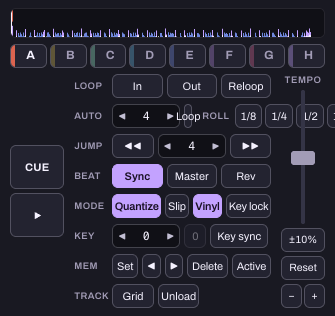
Now compare using Sync on deck 2 while deck 1 is the Master. It can help align playback using the track's analysed beat information. Judge the result by listening; the highlighted button alone does not establish that a transition works.
What if the beats slowly drift apart?
A gap that stays roughly the same suggests a position offset. A gap that grows suggests a speed difference, changing tempo or inaccurate analysis. These are clues, not a complete diagnosis. Start with a track with a steady, clear pulse before practising with live drumming or tempo changes.
A beat grid is the software's map of beat positions. Automatic analysis can be wrong, and an average BPM does not describe every beat of a changing-tempo recording. Serato's introduction to beat grids explains that distinction. Its editing instructions are for Serato; Hearhood has its own Grid control on each deck. Hearhood can use segmented, variable-tempo grids imported from rekordbox XML or a rekordbox USB export. Its own automatic analysis estimates one BPM, so importing a changing-tempo grid and analysing a file from scratch are different starting points. The deck’s Grid controls include One tempo, which flattens a segmented grid; keep the imported segments if you need the tempo changes. Listen to the result and check the grid rather than relying on an average BPM.
Do not keep nudging indefinitely if the problem returns every few seconds. Check the recording and analysis before assuming your timing is the only cause.
What if the beats match but the transition still feels wrong?
Listen for competing vocals, bass parts or section changes. A chorus arriving halfway through another chorus can feel busy even when the drums line up. Work on phrase changes or avoiding vocal clashes next.
What should I finish with?
Try to identify which problem you are hearing: a fixed offset, growing drift or a musically crowded overlap. That is a better first result than memorising one slider position. Stop both decks when you finish.
The full two-deck exercise uses the desktop layout and needs no controller or account. The creative tools are free during the current beta. The control captures use an original instrumental practice beat made in Hearhood. They demonstrate controls, not a recommended pair of songs.