Start making music as an adult beginner
Choose one small thing you want to make: a beat, a lyric or a tune. Hearhood gives you browser tools and guides for developing that idea. You can begin with one change and listen to what it does, without first learning every workspace or reading musical notation.
This page is for adults starting from scratch or returning after a break. The goal of a first session can be an idea you understand and can save, rather than a finished song.
Choose a starting point in HearhoodSee the getting-started guide
Pick the route that fits your idea
- I want to make a beat: follow your first beat. Start by hearing the pattern and changing one drum hit.
- I have a line or a story: follow starting a song with lyrics. Keep a few words and build a small musical idea around them.
- I can hum what I mean: follow the melody guide. Hum a part attempts to turn a short phrase into editable notes; check and correct the result.
- I know chord names: follow chords to a backing track. Chord labels need an instrument part before they become a backing you can hear.
You do not need to try all four. Choose one and leave the other workspaces for another session.
What a first beat exercise looks like
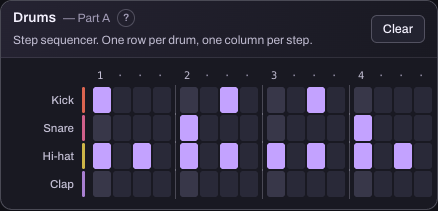
The rows represent drum sounds; the lit squares mark hits. This reference view shows the kind of pattern used in the linked beat walkthrough. A computer gives the grid more space; the phone layout needs sideways scrolling for later steps.
Try this comparison when following the walkthrough: listen to the original, change one hit and listen again. Write a short note such as “the clap is earlier.” Keep the change you prefer or return to the earlier version. You are practising hearing and making a choice, not passing a timing test.
Give your session a small finish line
A suggested first session has three parts: find the sound, make one choice and keep a copy. Take the time you need; this is a planning suggestion, not a promise of progress in a fixed number of minutes.
Your finish line might be one beat variation, two lyric lines or a short melody you have checked. For another day, try the beginner practice routine, which connects a question, a saved version and a manageable result.
What you need, and what is optional
The creative tools run in a browser and can be used without an account. A microphone is relevant to recording or humming; it is not required to click a drum pattern or write lyrics. A controller or physical instrument is not needed for those starting activities. See device and browser choices before assuming a particular setup supports every feature.
The beta is currently free. AI guidance, account sync, song links and community participation have separate account requirements. You can follow the linked first exercises without asking the AI assistant to do them. These browser exercises introduce musical decisions; physical instrument technique is a separate learning task.
Keep an editable copy
A listening export and a project backup do different jobs. Audio lets you listen outside Hearhood. An appropriate project export lets you continue editing. Browser storage can be lost, and recorded takes have separate backup considerations.
Follow saving and exporting and check the file you intend to keep before clearing site data or moving devices. Do not assume an audio export contains every editable part.
Common questions
Do I need theory before I start? The first-beat and lyric exercises here do not require reading music. Learn a term when it helps explain the choice you are making.
Can I keep my first attempts private? You do not need to publish a community post or upload a recording to try the local creative tools. Sharing is a separate choice.
Is this a course in playing a physical instrument? No. These routes introduce music-making in the browser. They do not assess hand position, breathing or physical playing technique.
About this page
Prepared for Hearhood, a music app by Scopra, with AI assistance and references to its existing feature guides. The practice example is an editorial suggestion, not a claim about tested learner outcomes. Read about Hearhood.