Share a song demo your bandmates can use
Start by deciding what the recipient needs to do. Send a listening mix for feedback on a fixed version. Send appropriate separate tracks when someone needs to change the balance, and MIDI when they need editable note instructions. Keep your own project backup and explain the request beside the files.
This is a guide to preparing a handover. It does not describe real-time shared editing, a live online rehearsal or automatic merging of everyone’s changes.
Choose between a recording and a project linkRead the separate-track guide
Give the next rehearsal one question
Before exporting, write what you want to find out. “Does the chorus feel too long?” is a different request from “Can you record a bass part?” That choice affects the files and explanation you need to provide.
Use a version name you can both refer to, such as Lantern-chorus-v02. A later export should have a different version label so feedback does not drift between takes.
An original demo-handover note
Here is an invented example you can adapt. It is not a message sent through Hearhood:
- Idea: Lantern chorus, version 02.
- Tempo and key: 96 BPM, C major.
- Passage: bars 9–12, the first chorus in this draft.
- Listening file: Lantern-chorus-v02-listen.wav.
- Question: does the chorus feel more open if the bass starts in its second bar?
- Requested response: one short listening comment before the next rehearsal.
The filenames and musical details are examples, not downloadable assets. If you later request a recorded contribution, agree the task and how it may be used before substantial work begins.
Choose files for the actual job
- Hear this version: export a full listening WAV and check the relevant passage.
- Balance these recorded parts: use the appropriate separate audio export and describe what each track contains.
- Edit note instructions: provide MIDI where supported; it is different from recorded sound.
- Continue your own project later: keep a suitable Song file or workspace backup with any recordings you need.
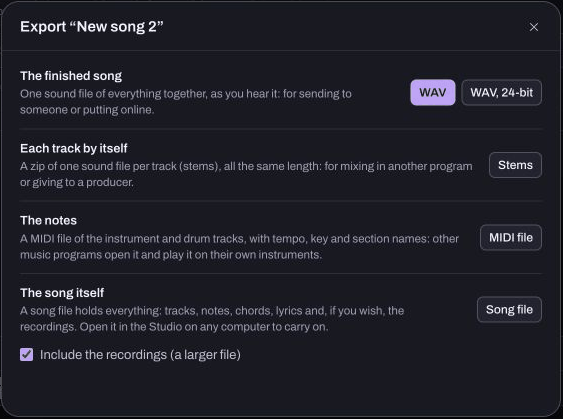
This reference capture shows Studio’s export choices. A single drum track may contain several drum sounds; exporting that track separately does not promise individual kick, snare and hi-hat files. Ask what the recipient means by “stems.”
Preserve timing when sending separate parts
Follow exporting separate tracks and keep the files at a common start. Leading silence may be what places a later entrance correctly. Trimming every file independently can change the alignment.
Keep a reference mix alongside the parts. Ask the recipient to compare an early and late passage after import. Check that the expected recorded takes are audible and that no required file is missing. A filename alone does not establish that an export succeeded.
Check what a shared link contains
A supported Produce song link carries editable musical data without recorded takes. It is not a replacement for a Studio recording export or a complete private backup. See recordings and editable links before choosing a link just because it is easier to send.
Use a communication route you already agree on with the recipient. This guide does not send a message, grant access or publish the demo for you.
Practise choosing the files
The companion Choose files for a band demo course asks you to distinguish separate recorded sounds from editable note instructions. It is a separate decision exercise; it does not export files or open a collaborator’s project.
For feedback itself, use asking a useful music question or giving a specific listening response.
Quick answers
Will everyone edit the same project live? That is not the workflow described here. Agree which copy each person uses and how you will compare the returned version.
Does MIDI contain my vocal take? MIDI contains note instructions rather than the recorded vocal sound. Choose the appropriate audio files when someone needs the performance.
Can I discard my project once the demo is sent? Keep a checked backup. The listening file, a shared link and the editable project serve different purposes.
About this guide
Prepared for Hearhood by Scopra with AI assistance. The Lantern handover is an original editorial example. Feature descriptions follow the current export and sharing guides; no band session or file transfer is claimed. Read about Hearhood.