Add a simple bassline to your beat
To make a simple bassline, start with one low note and a short rhythm that works with the drum pattern. Listen to where the bass meets the kick, then change one note or leave a gap. A clear repeated idea can support a beat better than filling every step.
Hear what a bass part adds
Compare the same four-bar drum pattern alone and with a simple low C bass part. Keep your listening volume steady and notice where the pitched bass meets the kick. These original synthesized teaching examples illustrate the difference; they are not Hearhood exports and do not demonstrate an exact app preset or grid pattern.
Download: Drums alone at 100 BPM (WAV)
Download: The drum beat with a low C bass part (WAV)
What does the bass add?
The kick gives the rhythm a low drum pulse. The bass adds pitched notes as well as rhythm. They share the low part of the sound, so their timing and space matter. Playing together is one starting point, not a requirement for every musical style.
1. Keep the first attempt small
Open Produce and start with the beat you made in the first-beat lesson. Keep an editable backup before changing an idea you want to preserve. In the Notes card, select Bass. The grid places pitch vertically and time horizontally.
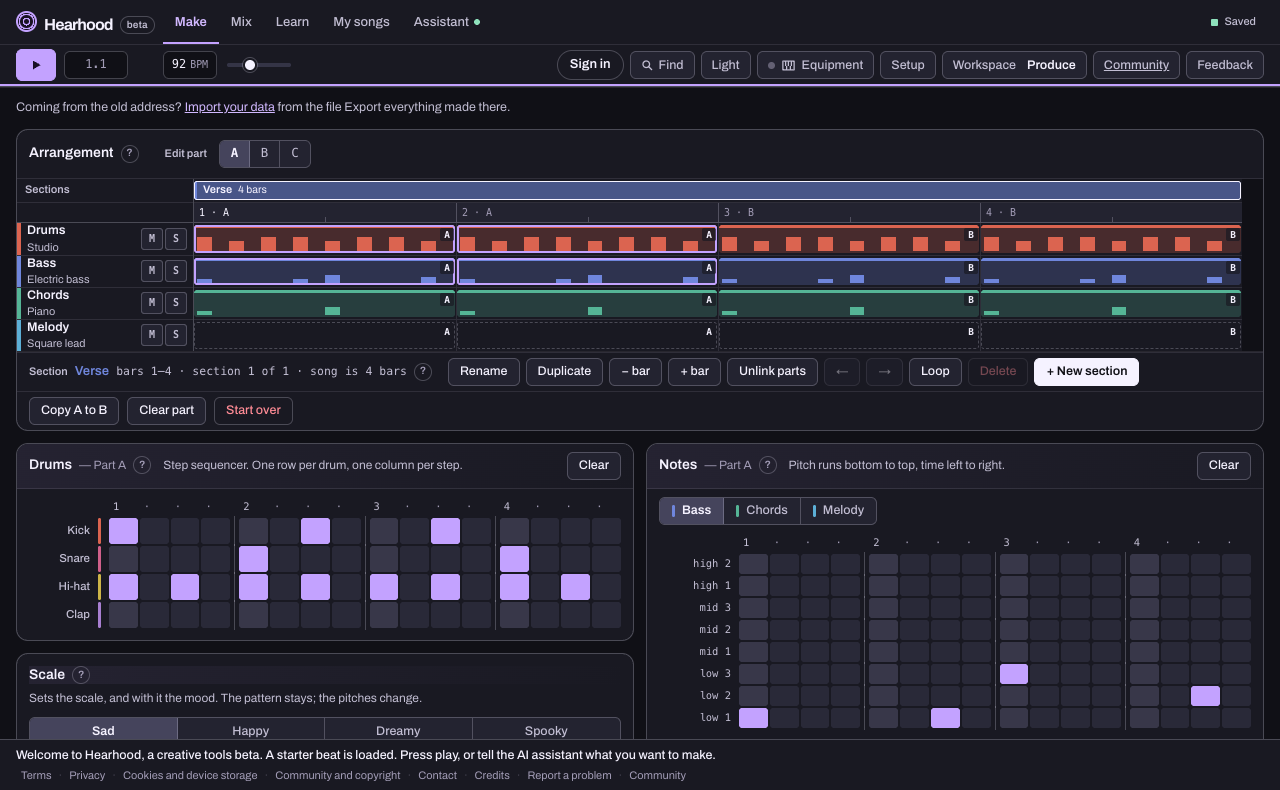
For an initial rhythm experiment, stay on one low row. You are hearing when the notes occur before deciding how the melody of the bass should move. If the song has chords, the chord's root note is one possible starting pitch; later notes still need to make sense with the harmony.
2. Place a few notes
Try notes at steps 1 and 9 of a sixteen-step 4/4 bar. That places one at the start and another halfway through. Use the same row for both, play the pattern and notice how those notes relate to the drums. You do not need to add a note on every kick.
Move the second note to step 11 and listen again. Then try removing it. Which version gives the rhythm the feel you want? Keep the drums unchanged while you compare.
3. Change pitch after the rhythm works
When the rhythm feels useful, change only one note's row and compare again. Listen against any chords already playing. Do not assume that a note works simply because it is low or belongs to a familiar scale.
If you want a backing based on named chords, follow the chord-to-backing guide. For more structure, give the loop a second section and change its bass pattern using independent parts.
4. Keep a version you can use
Save the editable project and export audio when you want to listen away from the grid. The export guide explains the difference. Finish with a short loop whose bass rhythm you can recognise and describe.