Play a small idea from a MIDI keyboard
A MIDI keyboard sends note instructions to an instrument. It does not send a recording of the keyboard's own sound. Hearhood's Songwriter can use supported incoming note messages to play the selected instrument or drum track.
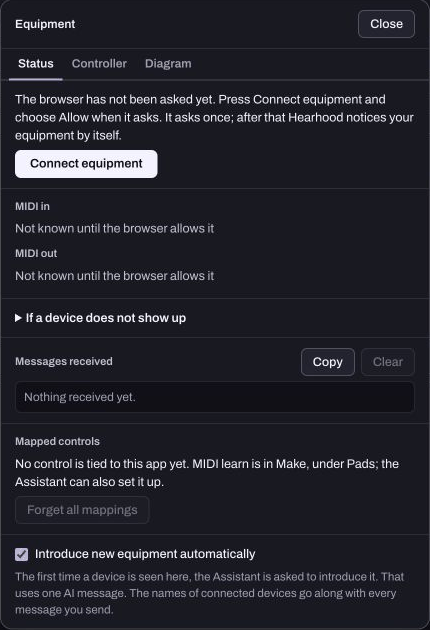
Check the connection in a supported browser
Connect the keyboard to your computer before opening the equipment controls. Use a browser that provides Web MIDI, such as a supported Chrome or Edge setup, and allow MIDI access only for the device and site you intend to use. Support can differ by browser and operating system.
The Web MIDI documentation explains the browser permission and compatibility model. A device appearing in a list is not a complete latency or hardware test.
Choose an instrument track first
Open Songwriter and select a piano or another instrument track. An audio or Your voice track is for recorded audio, so selecting it is not the same as choosing a playable note instrument.
Press one key and release it. Check that the note begins and ends as expected. If there is no sound, inspect the selected track, volume, mute/solo and browser audio state before changing the whole song.
Keep the first phrase small
Try three notes slowly. If you want to keep a performance as editable notes, use Songwriter's note-playing or rhythm-entry recording flow rather than assuming normal playback is always recording. Check the grid afterwards to see what was actually captured.
This differs from recording a microphone. The note editor stores instructions such as pitch, start time, duration and velocity. Read audio versus MIDI if those file types are unfamiliar.
Troubleshoot one thing at a time
If notes keep sounding, release every key and stop the transport before reconnecting. If a message does nothing, do not assume every pedal, knob or MIDI message is mapped; the keyboard note flow is narrower than a complete controller mapping.
Save an editable song-file copy after a useful experiment. A browser permission, a connected-device name or this guide cannot establish that every keyboard works correctly. The no-sound checklist is the next place to check an otherwise silent setup.