A rehearsal story
Your chorus works, but it feels too high to sing
Changing a song's key means moving its musical pitches higher or lower while keeping their relationships. In Hearhood's Songwriter workspace, Lower and Higher transpose editable notes and chords together, one semitone at a time. Existing audio recordings keep their original pitch.
You have a backing you like and a chorus that finally says what you mean. Then you sing it through. Most of it feels natural, but the highest phrase is awkward every time it comes around.
In Hearhood's Songwriter workspace, open the song's key control and use Lower or Higher to move its notes and chords together, one semitone at a time. That is called transposing. It lets you try the same musical idea at a different pitch without rewriting each part.
This example is for a song built from editable instrument notes and chords in the Studio. Existing voice or audio recordings stay at their original pitch when you use this control.
Hear one semitone lower
Compare a short melody with the same melody one semitone lower. The timing stays the same. These original synthesized teaching examples illustrate transposition; they are not recordings or exports from Hearhood and do not assess anyone's vocal range.
Download: Short melody at its original pitch (WAV)
Download: The same melody one semitone lower (WAV)
1. Keep a copy before changing the pitch
Open your song in Workspace › Songwriter. The area is also called the Studio. Choose Export › Song file to keep a separate editable copy first. If your project contains recordings you want in that backup, select Include the recordings.
Give the downloaded file a name that will make sense later, such as “chorus idea original.” It is easier to compare versions when you know which one you started from.
If you need a backing to try this with, the chords guide walks through creating one from C, G, Am and F.
2. Find the phrase you want to test
Play the song and try the same short phrase each time. You do not need to sing the entire arrangement for every comparison. Pick the line that feels too high and notice where it begins.
A lower key is an experiment, not a rule that lower always means easier. Listen to the low phrases as well as the high one. The aim is a version that feels more comfortable across the song.
Leave the tempo alone for this comparison. Changing BPM alters the pace; it is a different decision from moving the notes higher or lower.
3. Open the key control and choose Lower
The toolbar's key button may show a named key or No key if none is labelled. Open it. Beneath the key names, find Move the whole song higher or lower, then press Lower once.
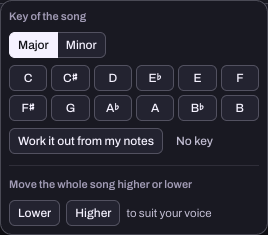
Each press moves the notes and chords by one semitone, the small pitch step between neighbouring piano keys. In our checked example, one press of Lower changed the chord sequence C, G, Am, F to B, F#, Abm, E.
You do not have to calculate those new chord names yourself. The important thing is that the parts move together. Stop after one press and listen before making another change.
4. Compare the same line again
Play the phrase and try it against the new backing. Is the difficult note easier to reach? Does the lower part of the tune still work for you? If one step is not enough, try another and compare again.
Use Undo if you prefer the previous version. Avoid making several unrelated changes at once. Keeping the rhythm and arrangement steady makes it easier to hear what changing the pitch has done.
You can also try Higher if a song sits too low. This tool supports a decision you make by listening and singing. The text assistant cannot listen to your voice or determine your vocal range.
What happens to recordings already in the song?
They stay as they are. The Studio's whole-song transpose control moves editable notes and chords, but does not pitch-shift existing recorded audio. A vocal recorded against the old backing can therefore stop matching the new one.
If you are still writing, finding a useful key before recording a final vocal can save another take. If a song already depends on recorded vocals or other audio parts, keep the original copy and consider what would need rerecording before changing its backing.
This walkthrough does not turn a commercial recording into a different-key karaoke track. It works with the Studio's editable musical parts.
5. Keep the version that helps you practise
When a version feels useful, export another Song file and give it a clear name, such as “chorus idea one semitone lower.” Choose WAV too if you want to listen or practise away from the app.
Listen to the exported audio before relying on it. In particular, check any recordings in the project, since those have not moved with the notes. You can keep both versions while deciding which one supports the song best.
Key change or tempo change?
Key changes move musical pitch. Tempo changes alter the pace, measured in beats per minute. For this exercise, keep the tempo steady so you can compare the same phrase at a different pitch.
Try the whole phrase before deciding. Lowering a song can help its high notes while making its low notes less comfortable. Hearhood's assistant cannot listen to your voice or assess your vocal range.