Understand family access before starting a music lesson
An age label on a lesson describes its teaching level. It does not grant permission to create an account or use every part of Hearhood. Before a young learner starts, an adult needs to check the current service rules and which activities are actually available.
This guide describes the family workflow prepared for a future release. It is not an announcement that all children can now join. Follow the current terms and the access choices shown in the live service.
Check eligibility first
The family design uses country-specific rules and an age floor. A parent’s consent does not bypass that floor. The current strict fallback floor in the implementation is 13, so it does not offer accounts for children aged 5–12. A country rule can be used only after the owner’s confirmation process.
Adults can use age-appropriate offline listening, clapping and invented-word activities without creating a child account. Do not enter a false age to get around an unavailable account route.
Parent-led setup is a separate step
Where the service permits it, the parent follows the dedicated family setup and consent process. Creating a general account and sharing its password is not a substitute for a supervised account. Read the consent information presented at the time and keep account recovery details private.
Permissions are separate choices
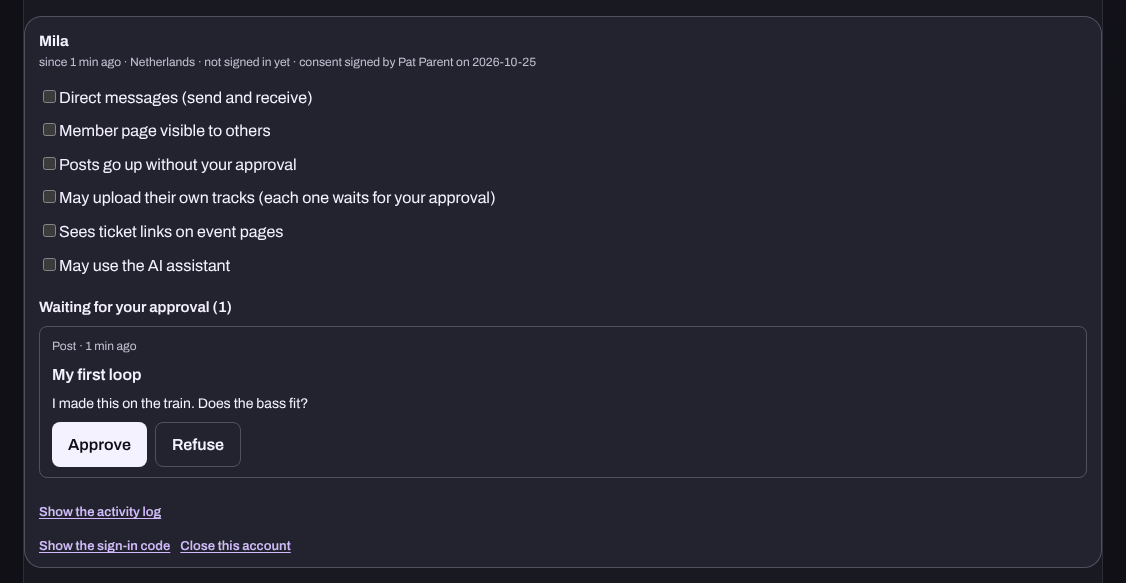
The family implementation starts with six permissions off: direct messages, a public member page, unrestricted posting, uploads, external ticket links and AI. Enabling one permission should not be treated as enabling the others. Some actions can require an approval as well as a permission switch.
For an initial music activity, start with the smallest set of capabilities needed. A note pattern or a pretend recording-level exercise does not require a public profile, an upload or a conversation with strangers.
Check approvals and changes together
Use the family page to inspect available approvals, permission settings and the activity log. Explain a change before making it so the learner understands what becomes visible or possible. If access is no longer wanted, follow the family account closure controls and read what the service says happens to the account and its content.
Quick answers
Can any child join if a parent agrees? No. The service’s age floor and eligibility rules still apply.
Does a children’s course require public sharing? The prepared starter activities do not.
Are the courses a substitute for an instrument teacher? No. Screen exercises introduce musical ideas; they do not assess posture, fingering, breathing or physical playing technique.