Change one thing, then decide whether to keep it
To compare two versions fairly, keep a named original, open a separate copy and make one deliberate change. Listen to the same passage at a similar volume. A louder or busier result is not automatically a better result.
This walkthrough uses Produce, an eight-bar practice song and one added clap. It does not need AI, an account or recorded vocals. Studio's song menu is a separate workflow; the control names below belong to Produce.
1. Keep an original you can recognise
Open Workspace › Produce › My songs. Give your starting song a clear name such as Comparison A - original. Under Backup, choose Download this song and find the downloaded file. Keep that editable file outside the browser while you experiment.
Write one sentence about what you want to check. For example: “Does an extra clap on beat 2 make the first bar feel more energetic?” That is a focused experiment. “Make the whole song better” gives you no clear stopping point.
2. Create the copy, then open it
Press Duplicate in the This song card. Produce creates another library entry but leaves the current song open. Click the new copy's name in the library before editing. Opening it takes you to Make; return to My songs if you want to rename it.
Call the copy Comparison B - extra clap, or name your own intended change. Check the library's open now label and the name in This song. Do not assume that pressing Duplicate switched you to the new entry.
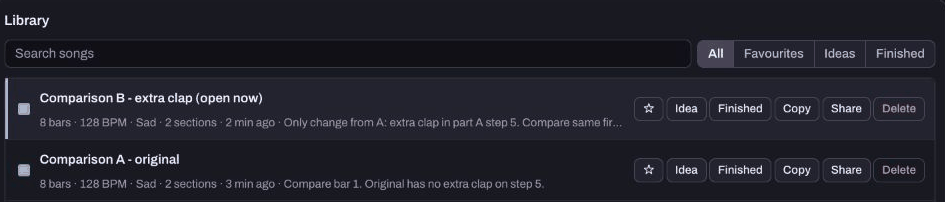
3. Make exactly one change
In Make, choose part A and add a clap on step 5, the start of beat 2 in this four-beat grid. In our example, part A appears in bars 1 and 2, so both uses of that part change. This is one pattern edit, not a claim that only one bar can be affected.
Keep the tempo, instruments, section order and other notes the same. If your song already has that clap, choose a different simple change and name it accurately. The first beat guide explains the grid.
Return to My songs and put the change and the passage to compare in Note about this song. Download B as its own editable song file. In our checked pair, the note-based song codes differed only in the intended clap pattern. Both files kept eight bars at 128 BPM.
4. Compare the same bit of music
Open A, play its first section, then stop. Open B and play that same section. Use the same listening setup and avoid changing the master level between the two. If one version changes the sound's level, take that difference into account rather than simply preferring whichever is louder.
Ask one question: does this edit help the goal I wrote down? Write an observation you can explain, such as “the extra clap makes the opening feel busier.” You can prefer A, prefer B or remain unsure. None of those outcomes requires deleting either copy.
These listening prompts are for your judgement. Our automated checks establish the saved edit and file contents; they do not establish that the result sounds better.
5. Use history as a second safety net
Version history in My songs lists earlier note-based states of the current Produce song. Bring back applies the chosen version to that song. It does not create another named library entry, and it is different from opening your separate A copy.
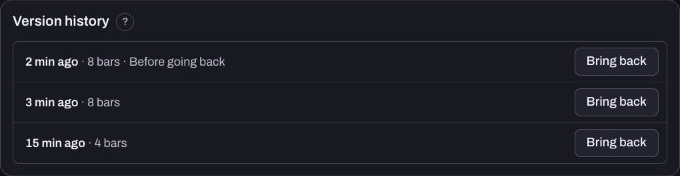
We used Bring back to return B's notes to the pre-clap state, then brought back the Before going back state and recovered B's extra clap. A stayed unchanged. Both named copies remained after reloading the isolated app.
History is not a complete recording backup, and its entries are not a permanent archive. For two versions you care about, keep the named copies and separate editable exports. See save and export for files that include the work you need.
Finish with a decision you can revisit
Keep one sentence: “I chose A/B because…” or “I need another comparison because…”. Stop after that one experiment. If you want another person's view, ask one clear feedback question and identify which version and passage you mean. The sharing guide explains how to attach a playable Produce song to a post.
Watch the short walkthrough
Watch the captioned 30-second walkthrough or download its captions. The video uses genuine captured app views and computer-generated narration. It is assembled from still views, rather than a continuous screen recording.
The same steps in text:
1. Name your starting song so you can recognise the original. 2. Duplicate makes a copy, but leaves the original song open. 3. Click the new copy in the library before making your edit. 4. Change one detail, then compare the same passage in both. 5. Bring back changes the current song to an earlier state. 6. Keep both named copies and their separate editable project files.
Download the learning practice pack for the editable examples, original synthetic tracks and worksheets. Keep your own project backups separate.