Give someone one useful thing to listen for
A useful feedback request tells someone what you are trying to do, where to listen and which question would help you next. You do not need production jargon or a finished song. A short, specific request is easier to answer than “Is this good?”
The examples here are writing exercises, not real member posts or replies. You can prepare your question without posting anything. If you choose to share it, keep the music's audience and the information in your post in mind.
1. Name your goal in everyday words
Start with what you want the listener to notice. “I want the chorus to feel different from the verse” is a goal. “Tell me everything wrong with this” is a much bigger job and can lead to contradictory suggestions.
Choose one area: the words, the change into a new section, the rhythm or the balance of two sounds. If you are still learning the terms, describe the moment instead: “when the drums come back” is useful language.
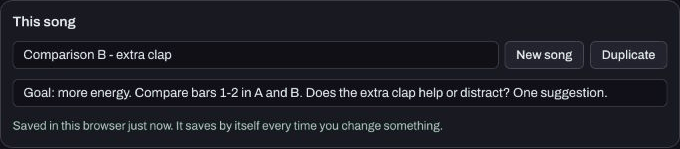
In Produce's My songs, Note about this song is a short place to keep a reminder while you work. It is not a community comment box. For a longer request, draft in your own notes before opening a post form.
2. Tell them where to listen
Give a short bar range or a recognisable event. For a listening file, use a timestamp only after checking it in that actual file. A project position and an exported file's timing can differ. In the checked Produce workflow, export repeats the arrangement, as explained in the short demo guide.
If you are comparing A and B, name them and keep the same passage in both. Do not ask someone to compare two links without explaining what changed. The version comparison guide helps you prepare a clean pair.
3. Ask one question people can answer
Here is an example to adapt:
I am trying to make the opening feel more energetic. Please compare bars 1–2 in versions A and B. B adds a clap on beat 2 of part A. Does that extra hit help the opening, or is it distracting? One suggestion is enough.
This is an invented practice request for an eight-bar example. It does not claim the music needs that clap. Replace the details with what is actually in your song.
For lyrics, you could ask: “Which line makes the story harder to follow?” For a mix: “Can you follow the words when the bass comes in?” For rhythm: “Does the first bar feel steady, or is one hit distracting?” Pick one, rather than sending all three questions at once.
A reusable shape is: “I am trying to… Please listen to… My question is… The help I would like is…” It works in plain text, including when the other person is listening with sound off and can only discuss the visible material.
4. Share something that contains the detail
A Produce song link carries editable notes and supported settings, not recorded takes. It cannot demonstrate a recorded vocal that stayed on your device. A Studio song file and a WAV listening file are different formats. Choose a listening copy that actually includes the sound you want reviewed, and check it before sending.
To use Hearhood's existing song-post workflow, sign in, open Produce's My songs, press Share next to the song, then use Post it on your community page. The form attaches that shared song. Add your question before choosing to post. Your first post may wait for a team check. Share and remix a beat explains visibility and copies.
Do not assume that publishing a Produce link automatically updates it after every later edit. If you make a new comparison, identify the version you are sharing. Public recorded-audio hosting, public DJ mixes and a commercial artist catalogue are separate planned services, not features this exercise unlocks.
5. Turn a reply into a small experiment
Thank the person for the specific observation, then decide what you want to try. Feedback is a perspective, not an instruction you have to follow. You can say, “I will test a quieter bass and compare the same line.” Keep your earlier version before trying it.
If people disagree, return to your original goal. You do not have to satisfy every preference in one edit. If nobody replies, that does not tell you whether the song is good or bad; you can still use your own A/B notes to choose a next step.
When you give feedback in return, use the responder's guide. Comments beside a shared song are public conversation, not private messages. Leave out private contact details and stop a conversation that becomes unwanted.
Your task is complete when your draft contains one goal, one passage and one question. Posting it remains your choice.
Watch the short walkthrough
Watch the captioned 30-second walkthrough or download its captions. The video uses genuine captured app views and computer-generated narration. It is assembled from still views, rather than a continuous screen recording.
The same steps in text:
1. Write your goal in everyday words, without production jargon. 2. Name a short bar range or a clear moment to listen for. 3. Ask one question about that moment, rather than everything at once. 4. Choose a sharing format that includes the sound you want reviewed. 5. Produce song links leave recorded takes on your device. 6. Posting is optional. Keep your earlier version before trying a suggestion.
Download the learning practice pack for the editable examples, original synthetic tracks and worksheets. Keep your own project backups separate.