Send separate parts someone can line up
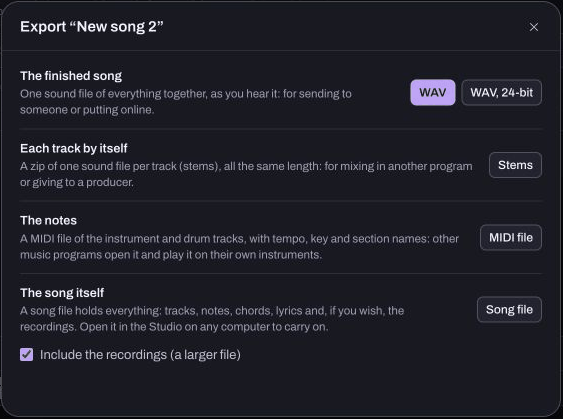
A single mix combines the song into one listening file. Separate track exports let another person change the balance of the parts. Hearhood Studio's Stems export offers separate audio for the song's tracks. Ask what the recipient needs before choosing files.
Agree what “stems” means
One person may mean a group called Drums, while another expects every individual instrument separately. Explain how your Hearhood song is organised. A drum track containing several drum sounds is different from separate kick, snare and hi-hat tracks.
Do not promise separate elements that were never separate in the project. Nor does an audio stem contain editable MIDI notes just because the original track used notes.
Keep a reference and an editable backup
Save a song-file backup with any recordings you need. Export a full listening WAV as a reference for how the parts are intended to sound together. This lets the recipient compare their imported session with your original balance.
The saving guide explains why an editable backup, reference mix and separate audio serve different purposes.
Use Studio's Stems choice
On a computer, open Studio's Export sheet and choose Stems. Keep the generated filenames clear. Transfer the files together so the recipient does not accidentally miss a quiet but important part.
Ask the recipient to import them at the same session start, without trimming the silence at the front of individual files. That silence may be what keeps a later vocal entrance lined up with the drums. Keep the tempo and any timing notes beside the files.
Verify the handover
Reopen or import the exported files in an appropriate test session and check an early and late passage. Confirm that the expected recording tracks are audible and that none of the files is empty. A filename is not proof of a successful render.
Include a plain note stating the song name, tempo, what each file contains and whether you want feedback or an actual edit. Agree credits and permission before release. Sharing the files is not itself an agreement about ownership or payment, and Hearhood does not provide artist payouts.