Make your own short podcast intro music
Start with a small musical phrase and decide where it ends in relation to the first spoken sentence. Keep the arrangement simple, compare levels and export an audio copy. Hearhood’s music tools can help you make that cue; assembling the complete episode in a podcast editor is a separate step.
This route is for making an original intro idea. It does not offer a licensed stock-music catalogue or guarantee that every sound or recording you bring into a project is cleared for reuse.
Start with a short arrangementOpen Hearhood
Decide what the intro needs to do
Choose one job: introduce the show before speech, signal a recurring segment or briefly support a spoken name. For a first attempt, make a cue that ends before the narration begins. That lets you assess the music without also balancing a full voice-and-music mix.
Write a fictional show name for the exercise, such as “Small Hours Notebook.” Keep real contact details and private recordings out of a practice example.
An original three-bar cue plan
Here is a short arrangement plan prepared for this guide. At 100 BPM in a four-beat bar, three bars take approximately 7.2 seconds before any sound tail or extra silence. The pace and duration are examples, not podcast standards.
- Bar 1: a small note phrase introduces the cue.
- Bar 2: repeat the phrase with one note or rhythm changed.
- Bar 3: play a final note or chord, then leave space for the voice to start.
The plan is written guidance, not a generated audio file. You can make a longer or shorter cue if that serves your show better. If you want help shaping sections, follow turning a loop into a song.
Keep only the parts the cue needs
Try the phrase on one instrument before adding drums and bass. If another layer makes the cue harder to recognise or leaves no space for the spoken opening, compare a version without it.
The chord-backing guide explains how chord labels become editable instrument notes. Typed show names or lyrics stay text; they do not automatically become a recorded announcement.
Compare levels before adding more processing
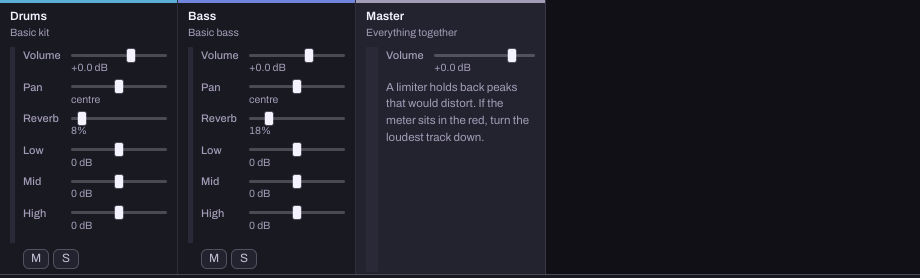
This reference capture shows an existing music example, not a podcast episode or a recording of a narrator. Each track has its own level; Master affects the combined output.
Follow the first mixing guide to compare one small level change. If you later place music beneath speech, compare it with the actual voice recording in the editor used for your episode. This page does not promise automatic speech detection, ducking or a one-click podcast mastering result.
If you choose to record an announcement in Hearhood, read recording vocals at home and test a short take first. Recording a voice is optional for completing the music cue.
Try a separate balance exercise
Hearhood’s published Make room in your mix course lets you lower a bass part and mute it for comparison. The higher sound stands in for the part you want to hear clearly. It is not a spoken-voice recording or a measurement of speech intelligibility, and its practice target is not a universal mixing setting.
A podcast-focused version of that exercise is being prepared separately. The existing course is enough to practise the listening comparison while you develop your cue.
Export the cue and check the episode opening
Use saving and exporting to keep an editable project and the audio file you need. A listening export does not include every editable project setting.
Play the exported file from beginning to end. Check any silence, the final sound tail and the transition to narration. Then assemble and check the opening in your episode editor. Exporting music from Hearhood does not publish a podcast, upload an episode or distribute it to listening services.
Quick answers
Can I make the intro without a microphone? Yes. The music cue can be built from editable musical parts. Recording a spoken announcement is a separate choice.
Will the app read the show name as a finished voice-over? Typing a name or lyric is not the same as recording a performance. This workflow does not create an announcement automatically.
Is original intro music automatically royalty-free? The rights depend on the compositions, sounds and recordings you actually use. A new arrangement or export does not erase third-party conditions. See permission and credit.
About this guide
Prepared for Hearhood by Scopra with AI assistance. The fictional show name and three-bar plan are editorial examples, not a tested podcast production or a recording. Read about Hearhood.