An arrangement story
The loop sounds good. Now what?
To develop a loop into a song sketch, give it a second section and make one deliberate contrast: a changed rhythm, a different melody or more space. In Hearhood Produce, duplicate the section and use Unlink parts before editing its pattern, so the original section stays intact.
You have listened to the same four bars about twenty times. The drums work. The bass has a little movement. You like it enough to keep playing, but every attempt to make it longer feels like more of the same.
To turn a loop into the beginning of a song in Hearhood, use the Produce workspace's Arrangement tools. Duplicate a section, name the new one, then Unlink parts before changing its pattern. That gives the second section its own parts while preserving the first.
This example makes a small verse-and-chorus sketch. You will change one drum hit, hear the difference and keep a version you can build on.
1. Start with a loop you want to keep
Open Workspace › Produce, then choose Make. If you have not made a beat yet, start with your first beat. You only need a short idea with a rhythm you like.
Before experimenting with an existing song, use the saving options in My songs to keep a separate copy. The save and export guide explains the difference between an editable backup and an audio file.
Listen once without changing anything. Ask a small question: what would make the next section feel a little different? It might need a clap, a pause or a busier melody. Choose just one change for now.
2. Give the loop a second section
In Arrangement, select the section you want to extend. Choose Duplicate to place a copy after it. With that new section selected, choose Rename and pick Chorus, or enter your own label.
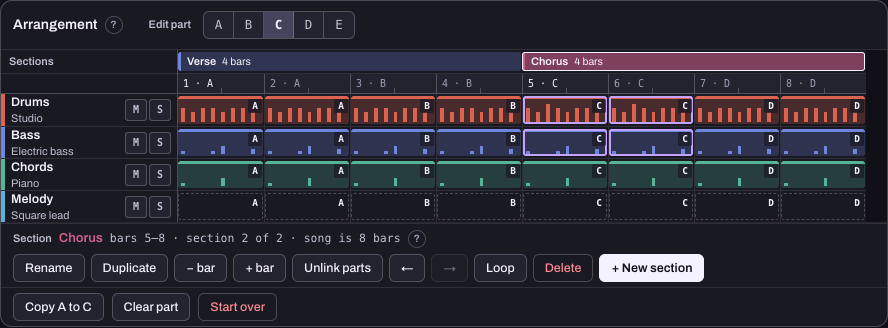
The example below starts with a four-bar Verse and duplicates it into a four-bar Chorus. Those labels organise the idea. They do not automatically make a section sound like a chorus, and you can use different names if your music follows another shape.
At this point, the song has two sections, but they can still use the same pattern parts. The letters above the patterns help you see that relationship.
3. Unlink the chorus before editing it
Keep the Chorus selected and choose Unlink parts. The copied section gets its own pattern parts. In our example, the Verse keeps A and B, while the Chorus uses C and D. Your letters may differ if you already have other parts.
This is the step that lets you experiment with the chorus without changing the verse. Duplicating a section alone does not make its shared parts independent.
4. Make one change you can hear
Select a part used in your Chorus. In the drum grid, add a clap to an empty step. The screenshot uses step 5 of part C. A step is one small time position in the pattern, shown as a column in the grid.
If that part appears twice in the chorus, both occurrences play the edited pattern. That is useful repetition. You do not need to draw the same change into each occurrence separately.
Now select a Verse part and check it. The extra clap should not have appeared there. If both sections changed, undo your edit, select the copied section and check that you used Unlink parts first.
Keep this first experiment in the pattern grid. The track mute button controls the track across the song, so it is not a shortcut for removing the drums from only one section.
5. Listen across the change between sections
Turn the section Loop option off if it is enabled, then play through the Verse into the Chorus. Judge the moment they meet. Does the added clap make the next section feel more active, or does it distract from the idea?
Try removing the clap and comparing again. You are learning what a change does, rather than collecting more layers. A chorus can feel bigger because of a small rhythmic change or an earlier section with more space.
If you like the contrast, you can extend the sketch with another section later. There is no need to build an intro, bridge and ending before you know whether these first two sections work together.
6. Keep the sketch and one note for next time
Save an editable copy using My songs. Export audio when you want to listen away from the grid. Try listening once while doing something else, then write one note such as “chorus needs a melody” or “verse already feels too busy.”
Your result is a short arrangement with a deliberate change. That is enough to move beyond the loop, even if the finished song takes a different shape.
Three ways to create contrast
- Rhythm: change one drum hit or add a pause.
- Melody: answer the first phrase with a slightly different one.
- Space: simplify an earlier pattern so a later one feels fuller.
Use independent pattern parts when a change should affect only one section. Duplicating a section is not the same as unlinking its parts. A track mute affects the whole song, so use the pattern itself for this exercise.
You have made progress when the second section has a purpose you can describe. Save an editable version and leave one note about what to try next.