Change the speed without confusing it with pitch
Tempo is how fast the beat moves. Pitch is how high or low a note sounds. Without key lock, speeding a recording up also raises its pitch. Key lock tries to keep the pitch while the speed changes. Key shift deliberately moves the pitch in small steps called semitones.
Hearhood's computer DJ layout has separate controls for these jobs. Start on one deck, at a comfortable listening level, with music you may use.
Hear the difference first
These short reference clips use the same original synthetic phrase. They illustrate the idea; they are not recordings from Hearhood's time-stretch engine or a claim about its sound quality.
- Original phrase: normal speed and pitch.
- Ten percent faster, with pitch raised too.
- Ten percent faster, keeping the note pitches.
- Normal speed, one semitone higher.
Without sound, compare the roles: the two faster examples finish sooner; only one also raises the note pitches. The semitone example keeps the original timing and changes the notes' height.
1. Keep a normal-speed reference
Load one practice track, pause it and return the tempo to its original setting. Keep key shift at 0. Choose a short passage you can find again with a cue. Note the track's original BPM so you know where you started.
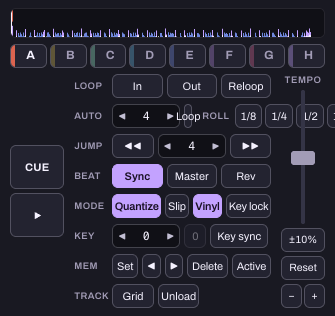
2. Try a small speed change
Leave Key lock off and move the tempo a little faster. Compare the same passage with the normal-speed version. Then turn Key lock on and compare again at that changed tempo. Use a small change before trying an extreme setting.
If your aim is matching another deck's tempo, pitch movement may be an unwanted side effect. If the pitch change is part of the sound you want, you can choose it deliberately. Neither setting is automatically the right artistic choice.
3. Try key shift separately
Return the tempo to normal. Change key shift by one semitone, compare the phrase, then return it to 0. Key shift is not the same as speeding the track up. Avoid changing tempo, key shift and effects at once while first learning the difference.
A detected key is a suggestion. Check it by listening, and treat the Camelot labels as a way to explore nearby keys rather than a promise that two tracks will sound good together. Rhythm, phrases and overlapping vocals still matter.
4. Recognise the full-engine limits
Key lock and key shift require the full audio engine. In the reduced player, the relevant controls are unavailable and the line above the decks explains the limitation. Key lock also rests beyond 50 percent faster or slower, while the platter is held, and in reverse. Do not mistake that behaviour for an unchanged key-lock result.
When finished, pause, reset the tempo and return key shift to zero. Keep a note of the small change you preferred rather than leaving an unexplained setting for the next session.
Watch the short walkthrough
Watch the captioned 30-second walkthrough or download its captions. The video uses genuine captured app views and computer-generated narration. It is assembled from still views, rather than a continuous screen recording.
The same steps in text:
1. Tempo is the speed of the beat. Pitch is how high notes sound. 2. Without key lock, changing speed also changes the pitch. 3. Key lock tries to keep the pitch while speed changes. 4. Key shift moves the pitch by small steps called semitones. 5. Keep changes small at first, and compare the same phrase. 6. Pause, return tempo to normal, and reset key shift when finished.
Download the learning practice pack for the editable examples, original synthetic tracks and worksheets. Keep your own project backups separate.