How do I stop two vocals clashing in a DJ mix?
Start by choosing when the songs overlap. Let an important vocal line finish, then introduce the next track during a clearer instrumental passage or use a shorter transition. EQ can change the balance, but it does not cleanly separate a singer from the rest of a finished recording.
You have matched the tempo and the drums feel close, but two singers seem to be talking over each other. Before adding effects, listen to the point where the second vocal enters. The timing and track choice may be the most useful things to change.
1. Listen to each track on its own
Open Hearhood's DJ workspace on a computer and load your own compatible music files using Add files. Use files you are entitled to use for practice. Hearhood has no commercial-song streaming catalogue.
Play each track separately. Find where its lead vocal starts, where a line finishes and whether there is a useful instrumental passage. Listen rather than assuming that a quiet-looking waveform means there is no vocal. Backing vocals, spoken samples and long reverberation can still fill the gap.
Write down one possible handover: “Let this line finish, then bring in the next track before its singer starts.” If there is no useful gap, a different pairing or a shorter transition may work better.
2. Mark a point you can find again
Pause the incoming deck at a possible starting point. Use the whole-track strip above its cue pads to move through the track, then listen and refine the position. Press an unused hot cue pad, such as A, to mark that position. Pressing an already set pad jumps back to its saved point.
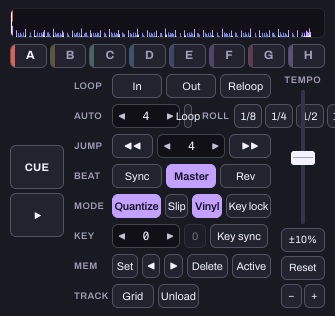
Cue points help you repeat a choice. They do not identify a vocal gap automatically. For a fuller walkthrough, see prepare your first DJ set.
3. Rehearse one short overlap
Begin with the crossfader on deck 1's side and the incoming track on deck 2. Check deck 1 is assigned A, deck 2 B, and the crossfader curve is Smooth. Keep the level comfortable and leave effects off.
Start deck 2 from your chosen cue. Move the crossfader towards deck 2 as the first vocal finishes, listening for the second vocal's entrance. Aim to make one lead line easy to follow. If you have not learned beat matching yet, keep the overlap brief and work on your first transition separately.
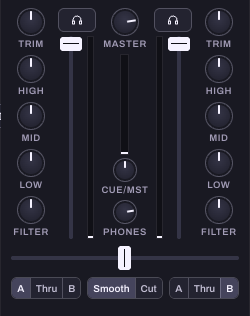
Repeat the same join and change only the handover point or overlap length. A shorter, well-placed change can sound clearer than a long blend.
Can I remove the vocal with the Mid knob?
No. Vocals share frequencies with instruments and cover more than one frequency band. Reducing Mid changes other sounds too, and may leave part of the vocal audible. Try small EQ changes for balance after finding a useful handover, rather than treating EQ as vocal removal.
Hearhood does not split a finished recording into stems itself. If you already have separate stem files that you are entitled to use, you can attach them to the track and mute parts such as vocals, drums, bass and other instruments. That imported-stem workflow is different from turning the Mid knob on an ordinary stereo file.
Do vocals always have to stay apart?
No. Deliberate overlaps can work, especially when one part is sparse or answers the other. For a beginner exercise, giving one lead vocal space makes the result easier to judge. Ask whether the words and musical ideas support each other, rather than applying an absolute ban.
If both tracks have continuous vocals, try another pair first. You are practising a decision you can hear, not proving that every pair must work together.
Check your result
- Can you follow the outgoing line to its end?
- Does the incoming vocal start at a clear moment?
- Does shortening the overlap help?
- Are the beats in time, or is that a separate problem to practise?
You can use these desktop controls without an account or controller, free during the current beta. The control captures use an original instrumental practice beat made in Hearhood. No audio is embedded here. A practice tool does not grant permission to publish someone else's music.