Start from a groove and make one change
A starter is a shared song the Hearhood team has marked as a useful starting point. Opening one uses the normal shared-song flow: you work on your own copy. You are not editing the original maker's project together in real time.
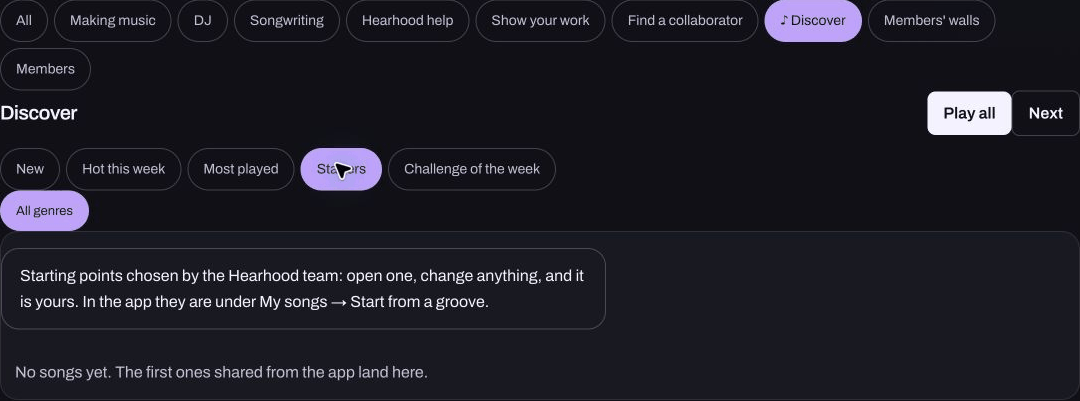
Find a starting point
On a computer, open Produce and My songs, then look for Start from a groove. You can also open Discover and choose Starters. Pick a starting point only when one is actually listed. If there are no starters yet, use Make your first beat to build a small idea instead.
A starter is not a finished song you must imitate. Its value is that you can hear a small idea before deciding what to change.
Listen before editing
Open the song in Hearhood and check its name and credit. Listen once at a comfortable level. Choose a single detail: one drum hit, the tempo, a bass note or the sound of an instrument. Leave the other parts alone so you can hear what your change does.
If you are unsure which control affects the sound, use Find or the nearby explanation rather than turning several controls at once. The account and community guide explains when sign-in is needed.
Save a version that means something to you
After changing the copy, listen again and give it a name you will recognise. Keep an editable Backup from Produce's My songs. A WAV or MP3 is useful for listening outside Hearhood, but it does not replace the editable backup.
Shared links carry notes and supported settings, not recorded takes. Do not expect a singer's recorded voice to arrive with a starter. Opening a link alone is also not a completed remix; changed saved copies are what the remix workflow tracks.
What should you share?
You can keep the exercise private. If you share your version, keep the original credit and describe your contribution plainly: “I changed the bass and left the drums.” A starter badge or remix count does not promise copyright clearance, exclusivity or earnings. See sharing and remixing before making a public link.