Start a song with a few lines and a backing beat
Start a song with one specific moment and two to four lines about it. Speak the words over a steady beat, shorten crowded lines, and keep one phrase worth repeating. You do not need a finished melody or a complete arrangement before trying the idea.
You do not need a finished melody to start writing a song. A few words and a steady rhythm can give you enough to explore how a verse might feel. This exercise uses the Songwriter workspace, also called the Studio.
You will make a short lyric draft over a backing beat, then save an editable copy. No microphone, controller, AI access or account is needed for these steps. The screenshots show the desktop workspace.
1. Pick a small idea to write about
Choose a moment you can picture: waiting for a train, leaving a conversation too soon or hearing a familiar voice. Write two to four lines about that moment. You can leave the rhymes and song structure for later.
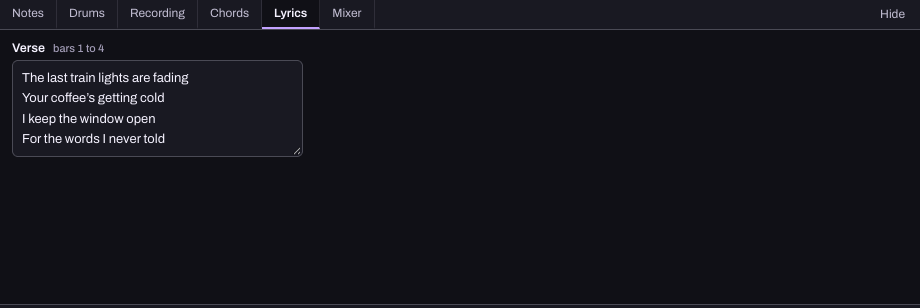
Here is the original example used in the screenshot:
- The last train lights are fading
- Your coffee's getting cold
- I keep the window open
- For the words I never told
Use your own words if something else comes more naturally. The purpose is to have a short phrase you can speak over a beat, not to finish a verse before you hear anything.
2. Open Songwriter and choose a backing beat
Choose Workspace › Songwriter, or open it below. On a new, empty song, the Start a song panel offers Hum a part, Start with drums and Start with chords.
Choose Start with drums. This adds a pop drum part and opens its editor. The Feel menu offers other starting patterns. Keep the first one for now so you can focus on the words. If you already have a song open, keep a song-file copy before experimenting with it, or choose a new song from the song menu.
3. Put your words in the Lyrics tab
Choose Lyrics in the editor below the timeline. Type or paste your lines into the lyric box, with a new line for each phrase. Writing here keeps the words with your editable Studio song. It does not turn the words into a sung recording.
4. Speak the words over the beat
Press Play in the Studio toolbar. Say the lines aloud at a comfortable volume. Notice where you run out of space or where a pause feels right. You can tap the beat on your desk; there is no need to sing yet.
If a line feels crowded, try removing a word before speeding up the whole song. If every line feels too rushed, lower the BPM number in the toolbar a little. BPM means beats per minute: a lower number gives you a slower pulse.
Stop playback before editing another part, then listen again. Keep a line that feels natural even if it does not match the first version you imagined.
5. Give the idea a shape
Once the short draft feels comfortable, think about what should change in a chorus. It might repeat a useful phrase, say the main feeling more directly or leave more space around the words.
You can mark sections with + Section. With sections such as Verse and Chorus on the timeline, the Lyrics editor gives each its own box in song order. Add sections when that organisation helps; you do not need a whole arrangement for a first draft.
If the assistant is connected, you can ask for feedback on the intention rather than ask it to rewrite everything:
- Help me develop this verse. Ask what I want it to mean before suggesting new lines.
- Suggest one way to make room for the words. Do not change the song yet.
6. Save the idea so you can return to it
The Studio saves in this browser. For a separate editable copy, press Export › Song file. This preserves the tracks, notes, chords and lyrics. If you later add voice recordings, check Include the recordings when you want those in the file too.
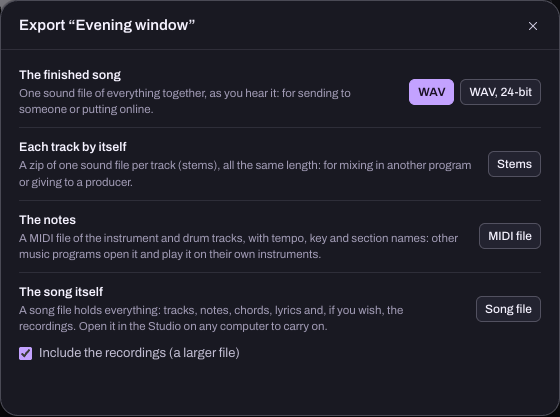
A WAV export contains the song's audio. Text in a Lyrics box is not a vocal performance, so it will not be heard in that file unless you record it. If you want to sing later, the Studio's recording controls will ask for microphone permission when you use them.
A small songwriting checklist
- One moment or feeling the song is about.
- A few lines you can speak naturally.
- A steady backing rhythm you can follow.
- One phrase that might belong in a chorus.
- An editable song file you can reopen.
If the words are the difficult part, work through the lyric-writing lesson. If you already know some chords, build a backing part. If you have a tune but no words yet, use the melody capture guide.