Mix your first song by listening to one change
Mixing means deciding how the parts of a song work together: which feels closest, which supports it and what needs more space. Begin with track levels. You can make a useful first mix before adding extra effects.
This exercise uses Hearhood's computer Songwriter mixer. Save an editable copy first. Choose one short section and use the same section for every comparison.
1. Choose what the listener should follow
Pick the main idea: a vocal line, a melody or a rhythm. Write it down. Play the section and ask whether that part is easy to follow without turning the whole song up.
Here are two original Hearhood examples at 100 BPM. The first is drums alone; the second adds a low C bass part. They illustrate adding a musical layer, not a matched-loudness mixing contest.
Download: Four-bar drum pattern at 100 BPM (WAV)
Download: The pattern with a low C bass part (WAV)
Listen at a comfortable level. Notice whether you can follow both the low drum and the bass. A louder result is not automatically a clearer one. In your own song, try a small bass-level change and compare the same bars again.
2. Balance the parts with Volume
Open Workspace › Songwriter, then Mixer in the lower editor. Each track has Volume, Pan, Reverb, Low, Mid and High. The Master strip controls the combined song.
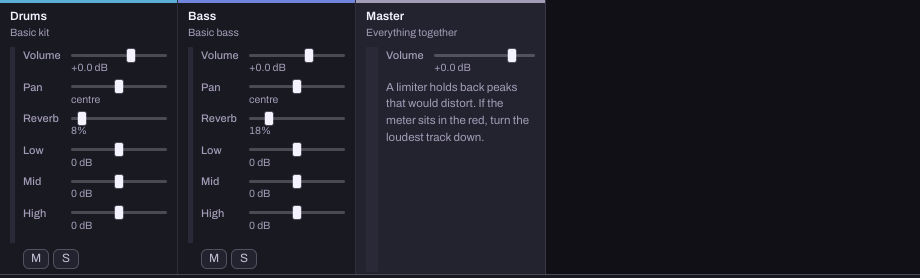
Start with the main part at a comfortable level. Bring supporting parts up only until they do their job. If two parts compete, try lowering the distracting one before raising the one you want to hear.
M mutes a track and S solos it. Solo can help identify a noise, but return to the whole mix before deciding on a level. A bass sound that is lovely alone may hide the kick when both play.
3. Leave room for the combined sound
Several tracks add together. Clean individual tracks can still make an overloaded mix. Watch the Master meter while the busiest section plays. If it stays in the red, turn the loudest tracks down.
The mixer states whether a limiter is available. A limiter can hold back peaks; it cannot repair a microphone recording that was already distorted. There is no required fader position that makes every song safe. Listen and check the actual result.
4. Try Pan and tone only for a reason
Pan moves a track left or right. Try a small change on a supporting instrument, then return it to centre and compare. Keep checking whether the main idea is clearer. Stereo placement cannot separate sounds in the same way when you listen in mono.
If a part sounds too heavy or sharp, make one small change to Low, Mid or High, then undo it to compare. Those are tone controls, not a diagnosis. You may need fewer notes or a different sound instead of more equalisation.
Keep Reverb restrained while learning the balance. If extra room makes words harder to understand, compare with less of it.
5. Export and check somewhere else
Choose Export › WAV, listen to the exported file and check that it contains the intended section and recordings. Try another ordinary listening device at a sensible volume. Write one thing to improve rather than rebuilding the whole mix at once.
Keep a Song file including the recordings so the mix stays editable. The account's synced copy does not include recorded audio.
How this exercise was checked
The screenshot and level controls were checked in desktop Chrome on 24 October 2026. The audio examples are existing original Hearhood exports. They contain programmed drums and bass, not a vocal performance. Audacity's recording troubleshooting reference also explains why combining tracks can overload a mix and why lowering playback cannot undo input clipping.
Hear one change before making another
Compare the original reference phrase with the same phrase with quieter bass. These are original synthetic examples, with the tune held steady. Follow hear one mix change for the exact changes and a written equivalent for sound-off practice.