Check the copy before leaving your old device
Hearhood account sync can keep supported editable music work with your account. It excludes recorded takes and DJ audio files. Seeing your account name on a second device is therefore not proof that every part of a song or DJ setup travelled.
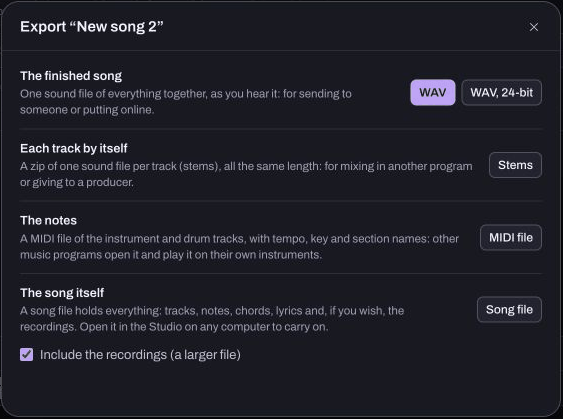
Keep a complete local backup first
On the original device, export work you want to retain. In Studio, a Song file with recordings included is different from a public Produce link. Keep the original DJ files separately from library cues and playlists.
The backup guide gives the available options. Do this before clearing browser storage, reinstalling or lending the device to someone else.
Check the account copy deliberately
Sign in to the intended account and inspect its sync information. The app checks for changed work periodically and when it goes out of view. It is not a promise that every keystroke is instantly on every device.
Wait for a successful account copy before relying on the second device. If it reports a failure, retain the original device and backup rather than treating another page reload as proof that the transfer succeeded.
Open and inspect the second device
Sign in to the same account there. Check the song name, tracks, an early passage and a later passage. Confirm editable notes and supported arrangement information, not only a title in a list.
If the notes arrived but a recorded voice is missing, that is consistent with the recording exclusion. Bring the recording in through an appropriate complete project export rather than repeatedly resyncing the same notes.
Avoid editing both copies at once while checking
Account sync is not a simultaneous collaboration room. Changes can be resolved by the app's supported snapshot behaviour, so keep independent exports of competing versions before choosing between them. If two devices show different work, stop making new changes until you know which copy you want.
Short-course progress and practice notes stay in the browser and are separate from song sync. Likewise, an account-data download is not a complete song backup. A successful move is one you have opened and checked, with the files that sync intentionally leaves out kept separately.