Practise your first DJ transition, one control at a time
To mix two songs for the first time, load one on each deck, check their levels, and practise bringing the second track in while the first leaves. Start with a short crossfade. A smooth volume change and matched beats are separate skills; the crossfader alone does not align the rhythms.
A DJ transition is the moment you move from one track to another. For this first exercise, the goal is simple: hear how two tracks enter and leave the mix. You can work on matching their beats once the controls feel familiar.
You will need a computer, headphones or speakers, and two compatible music files you can use for practice. No controller or account is needed. The screenshots use the full desktop layout; the phone layout shows a smaller set of controls.
1. Open DJ and bring in your tracks
Open Workspace in the top bar and choose DJ, or use the button below. The Start here strip sits above the decks. Choose No controller if you are using the screen and keyboard.
In the library below the decks, press Add files and choose your music files. This copies them into this browser's storage on your device. Add folder reads a folder in place on Chrome or Edge on a computer, so keep that folder available. You can also explore Free music from the library.
2. Load one track onto each deck
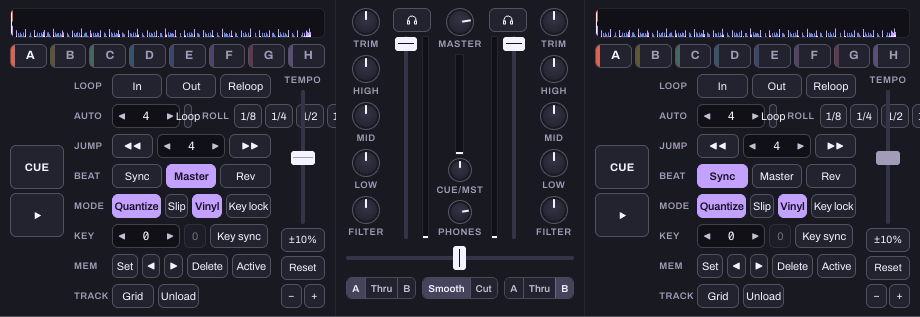
Drag a track from the list onto deck 1, on the left. Drag the other onto deck 2, on the right. If you prefer the keyboard, select a track in the library and press Shift+Left arrow for deck 1 or Shift+Right arrow for deck 2.
Check that each deck now shows a track title rather than an empty-deck message. Press deck 1's triangular Play button. If a sound-unlock message appears, press Start sound. Start at a comfortable listening volume.
If nothing plays, follow the sound checklist before adding effects or changing tempo.
3. Learn the two volume controls you need
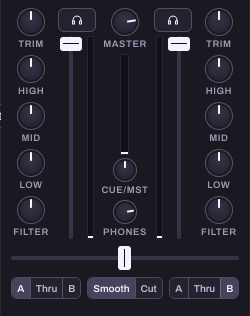
The tall slider for each channel controls that deck's level. The horizontal slider beneath the middle of the mixer is the Crossfader. With the default assignments, left favours deck 1 and right favours deck 2. Check the small assignment controls below it: deck 1 should be A and deck 2 should be B. Thru means a deck ignores the crossfader.
For this exercise, leave the curve on Smooth. Leave effects off and the EQ and filter controls at their starting positions. Keeping the setup simple makes the crossfader easier to hear.
4. Try a slow crossfade
Move the crossfader to the left, so deck 1 is the track you hear. Start deck 2 while leaving the crossfader on the left. Then move the crossfader slowly towards the middle. You should hear the second track join the first. Continue to the right until deck 2 takes over.
If the rhythms clash, that is useful feedback from the exercise. A crossfade changes the balance between tracks; it does not automatically put their beats in time. Stop deck 1 and repeat with a shorter blend, or choose tracks with similar tempos for the next attempt.
5. Repeat with one clear listening goal
Try the transition again and focus on just one thing: does the second track enter too suddenly, does the overlap feel too busy, or does the volume jump? Change one control and compare. You are learning the effect of that control, rather than trying to create a finished set in one session.
If you have assistant access, ask for an explanation before asking it to change anything on the decks. Deck changes do not have the song editor's assistant Undo.
- Explain the crossfader using my loaded decks. Do not change any controls.
- Walk me through matching the tempo of these tracks, one step at a time.
The assistant uses track and control information. It cannot hear whether the transition sounds good. Your listening is what matters here.
What to try next
Once you can bring a track in and out comfortably, practise cue points and tempo matching. CUE returns to the deck's cue point; the A to H hot cue pads mark other places you can jump to. Learn one before adding the next.
Hearhood does not include a commercial streaming catalogue. For practice, use music files obtained through an authorised source. This exercise does not publish your mix or grant permission to share someone else's recording.
Which two tracks should I choose?
Begin with tracks whose tempos are close and whose rhythms you can follow. Try an overlap with fewer competing vocals or busy parts. A short, clear change is a useful first result; a long blend is not automatically a better one.
Check the result
- Can you hear each track by itself?
- Does the volume jump when they overlap?
- Do the beats line up, or sound like two competing pulses?
- Did you choose a clear point for the second track to enter?
Next, count beats and bars, then listen for phrase changes. Focus on hearing why a transition works.