Share a small idea, then let someone try their own version
A Produce song link lets someone listen to your beat and open a separate editable copy in Hearhood. It carries the notes and supported settings, not your recorded takes. It is different from an MP3 listening file, a Studio song file or a private backup.
1. Keep your own copy first
In Produce, open My songs and use Backup to download an editable copy. If your idea includes recorded audio, make sure your backup includes it. Listen before sharing and use music and material you have permission to share. The saving guide explains the file choices.
2. Make a Produce song link
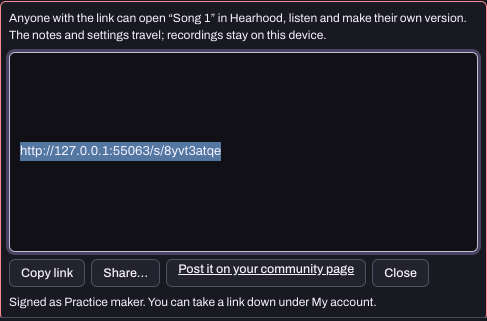
Sign in to a free Hearhood account. In Produce's My songs, press Share beside the song. Read the notice about what travels with it, then use Copy link. Your display name identifies who shared the song.
Anyone who has the link can open it. The recipient can hear it and open an editable copy; changes to that copy do not change your original. The shared link is a snapshot, so do not assume later edits to your original automatically update an existing link. Studio song files and the phone's Share sheet are separate file-export workflows, not this Produce link.
3. Attach it to a community post if you want feedback
The Share box offers Post it on your community page. It opens a post form with the song selected. Write one clear question, such as “Does the second section feel different enough?” The card can play inside the post. Your first post may need a team check before others can see it.
Shared links are listed under Songs on your member page by default. A song card and play count do not establish that a track is licensed for a commercial catalogue or earning money.
4. Try a remix without changing the original
Open someone else's shared song and choose Remix this or open it in Hearhood. Change one musical detail and save your copy. The app keeps a credit to the original and can count the remix and notify the sharer. Opening the song alone is not a completed remix. Remix counts are activity counts, not payments or a transfer of music rights.
Try changing one drum hit or the tempo first. Listen to what changed before sharing a copy of your own.
5. Know the difference between hiding and taking down
Open Account settings and find your shared links. Hiding a song from your member page removes its listing; people who already have the link can still use it. Taking down the link makes that link unavailable. Neither action recalls copies or exports someone already made.
For private work, keep a backup and do not create or distribute a public link. Blocking a member controls community contact; it does not turn an already copied link into a private file.
One small exercise
- Make an original four-bar beat and download its editable backup.
- If you choose to share it, create the link and check it in a separate tab.
- Confirm that the right song name and sharer appear, and that recorded takes are not included.
- Make one change to the copy and confirm your original stayed as intended.
- Decide whether to keep the link, hide its member-page listing or take it down.
There is no need to publish a post to complete your practice. You can stop after the backup and file check.
Check permission as well as credit
Naming the original maker does not automatically grant permission to reuse their work. Before sharing or releasing a remix, read sharing permission and credit and keep a record of the permissions or licence that apply to every included part.