Audio, MIDI or project file: which should you save?
Save audio when you want someone to hear the result, MIDI when you want to transfer editable musical instructions, and an editable project or song file when you want to reopen the work with its supported structure and settings. Keeping a listening copy and an editable backup serves two different needs.
Audio keeps the sound you hear
An audio file contains recorded or rendered sound. A stereo mix combines the parts into a listening result; it does not preserve each instrument as a separate editable track. WAV is a full-quality audio option; MP3 uses lossy compression for a smaller listening file. Hearhood Produce exports either from My songs. The Studio and DJ recorder currently export WAV, not MP3. Neither audio format preserves separately editable notes, lyrics or instrument settings.
Here is an original synthesized drum example saved as WAV. You can listen to it without having the project or instruments that created it. This is teaching audio, not an export captured from Hearhood.
Download: An example of a listening file: a four-bar drum beat (WAV)
Downloading that WAV does not give you a drum grid whose kick notes you can move individually. You could edit the audio itself in suitable software, but that is different from recovering the original notes and instrument settings.
MIDI keeps instructions, not the instrument's sound
MIDI can describe events such as note pitch, note start, note duration and velocity. A receiving instrument uses those instructions to make sound. Playing the same MIDI with a piano sound and a synthesizer sound can produce very different results.
A MIDI file is not a recording of your voice and does not inherently contain the sound of the original instrument. A transfer can also depend on the exporting and importing programs' supported messages. Check the result instead of assuming every control, lyric, effect or articulation survived.
Use MIDI when you need editable notes in another compatible music program. Keep audio as well when the exact sound is important.
A project keeps the supported editing structure
A native project or song file can retain tracks, notes, arrangement and other app-specific information. The exact contents depend on the format and export options. Some formats include recordings; others reference external files that must stay available.
In Hearhood's beta, browser storage holds your local projects. Signed-in account sync keeps an editable copy of your work without recorded takes or DJ audio files. Keep an exported copy including recordings before clearing browser data or relying on another device. A public Produce song link is also different from a backup: it carries notes and supported settings, excludes recordings and is usable by anyone with the link. Keep private work in a checked backup instead.
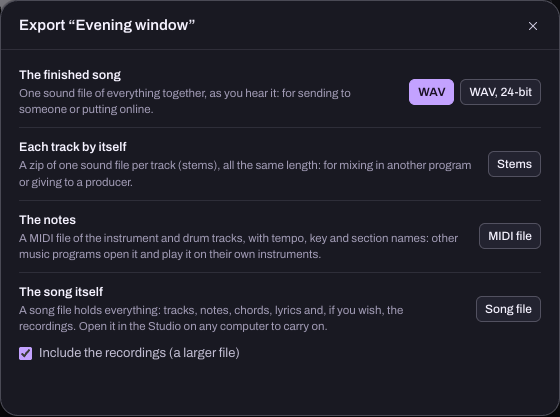
The save and export guide explains Hearhood's Produce backups, Studio song files and options for including recordings. A project file is useful only if you can reopen it with the material you need.
What if you need separate audio parts?
Separate audio exports let you adjust the balance of parts without starting from one combined mix. Depending on the workflow, these may be individual tracks or grouped stems. Ask what the recipient needs: “drums together” and “every drum instrument separately” are different requests.
Exporting parts from your own editable project is also different from trying to separate instruments in an already mixed recording. Do not assume one feature performs both jobs.
Try a two-file backup check
- Choose a short idea you can recognise and keep the original project in place.
- Follow the export guide to download a listening WAV and an editable song or backup file appropriate to your workspace.
- Play the WAV outside the app. Check the intended section and sounds are present.
- Reopen or import the editable copy, retaining the original. Check the parts, notes and any recordings you need.
- Give the files recognisable names and keep another copy somewhere you control.
Finish when you know which file you would send for listening and which file you would use to continue editing. A successful download alone does not confirm that a backup contains everything.