Make background music that leaves room for your video
Choose what the viewer should follow, then make a small music cue that supports it. If the video contains speech, compare the music with the actual voice before choosing its level. Export the music as audio and finish the timing in your video editor.
Hearhood provides music-making and audio-export tools. It does not assemble the video, synchronise music to its cuts automatically or publish the finished clip.
Start with the mixing guideOpen Hearhood
Give the cue one job
Write down what matters most: an explanation, a product demonstration, a place or a visual joke. A voice-led explanation may need a restrained backing. A silent opening might give the music more room.
For this example, imagine a twelve-second clip about folding a paper boat. The notes below are a brief for your music and video edit, not an automatic timeline:
- 0–4 seconds: show the paper and establish a small musical idea.
- 4–8 seconds: explain the fold; keep speech easy to hear.
- 8–12 seconds: show the boat and let the cue come to an ending.
Those timings are invented for this exercise. Your video can have different lengths and priorities.
Make a musical idea before filling the whole clip
Start with a short tune or a few chords. Follow chords to a backing track if you want accompaniment from chord names, or turning a loop into a song to introduce a contrasting section.
Try fewer notes during a passage that contains explanation. Give any added part a reason to be there. A cue does not need continuous drums, bass and melody throughout every shot.
Compare one level change
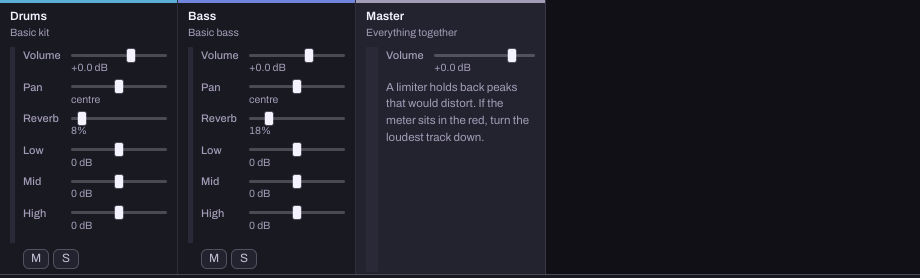
This reference capture shows an existing music example, not a video-editing timeline. Each track has its own level; Master affects the combined output.
These existing original Hearhood examples demonstrate a controlled bass-level comparison. They contain synthetic musical sounds, not narration:
Open the original reference phrase, then the same phrase with quieter bass.
Listen to the same passage in both. With sound off, the written difference is that the bass is lower while the tune is unchanged. The comparison guide describes the examples. A clearer tune here does not establish whether speech will be clear in your video.
Check against the actual voice and picture
Export a listening copy and place it in your video editor. Play the section with the real narration. If the words become harder to follow, compare less music or fewer parts before making another version.
Recheck the start, any important scene change and the ending. Listen at a comfortable level on an ordinary playback device. Hearhood is not providing automatic ducking, video synchronisation or a universal loudness setting in this workflow.
Practise balance separately
The companion Balance music for a video course lets you lower and mute a practice bass part. It introduces the comparison used above without editing your song. Its numbers are practice targets, not settings to copy into every video.
Keep two kinds of copy
Use saving and exporting to keep an editable project and the audio required by your video workflow. Check that the audio contains the intended section and any recordings you meant to include. An audio export is not an editable video project.
If your project includes other people’s sounds, compositions or recordings, check their conditions before distribution. Making a new arrangement does not provide blanket commercial-use clearance; see permission and credit.
Quick answers
Does Hearhood edit my video? This workflow makes music. You assemble and check the video in the editor you use for the clip.
Will the music automatically move around speech? No automatic voice-aware adjustment is described here. Compare your actual voice and music and make the necessary changes in your workflow.
Do I need to record my voice to make the cue? No. You can make the music separately and check it against narration later.
About this guide
Prepared for Hearhood by Scopra with AI assistance. The paper-boat brief is an original planning example; the audio comparisons are existing Hearhood practice examples. This page does not claim a video integration was tested. Read about Hearhood.