Make a simple background music idea for your game
Choose one moment in the game, write a short musical idea and keep the backing simple enough to hear it repeatedly. Export the audio and test it in the actual scene. Hearhood can help you compose and arrange the idea; game-engine playback, loop points and interactive behaviour are separate tasks.
This guide is for a first music sketch, such as a quiet exploration scene. It does not provide an adaptive soundtrack system or promise that a browser export will loop seamlessly in every engine.
Learn how a loop becomes an arrangementOpen Hearhood
Write a one-sentence scene brief
Use a description you can test: “A character explores an empty station; the music should leave room for footsteps.” That gives you a reason to limit the parts. You can later decide whether the scene needs a clearer pulse, a different sound or less music.
Do not assume the same cue suits menus, exploration and action. Pick one scene before composing for the whole game.
A small original motif plan
Here is a note pattern prepared for this guide. A motif is a short idea you can recognise when it returns. In this example, count four beats per bar and place one note on each beat:
- Bar 1: C, E, D, G
- Bar 2: C, E, D, C
- Bars 3–4: repeat bars 1–2
- Bars 5–8: repeat the same notes and change one backing layer
Start at a pace you can count comfortably. The plan specifies notes and structure, not a downloadable project or a finished soundtrack. Use note timing to separate when a note starts from how long it lasts.
Listen to the motif alone before adding harmony. If you prefer another note, change it and compare. No particular note pattern guarantees a mood.
Give one repeated section a different role
Follow turning a loop into a song to practise keeping sections separate before changing a pattern. For this game sketch, your working notes might call the two versions A and B. Those are labels for your plan, not game states controlled by Hearhood.
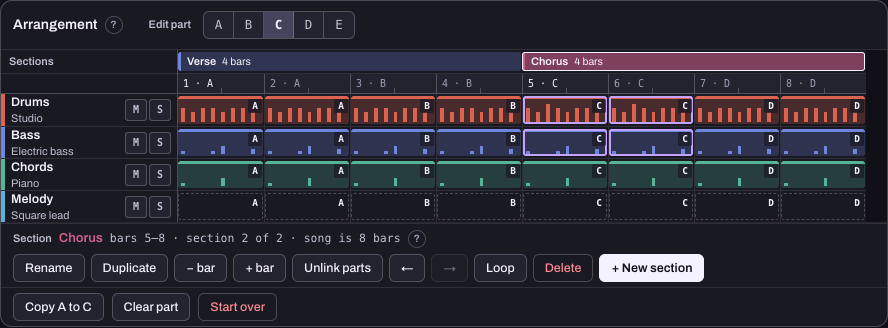
This reference capture uses song labels. It illustrates the principle of separating patterns before editing one section; it is not a screenshot of a game-music mode.
For the eight-bar plan above, keep the motif and try removing a backing part from one version. Check that the other version still has the original pattern. Track Mute affects the whole song, so use the section-specific pattern workflow described in the guide when you want only one section to differ.
Check music against the scene
Export a listening copy and compare it with the scene in your game. Ask whether the music covers dialogue, footsteps or another cue the player needs. Try a quieter version or fewer parts before adding another layer.
The first mixing guide provides a controlled level comparison. Its example demonstrates a listening decision, not a game-audio loudness target.
Practise the idea before building the arrangement
Hearhood’s published Find a little melody course lets you choose a short note pattern and compare a lower version. It is a separate practice space, not a change to a game project. Read the explanation and try its optional sound example; keep your intended notes separately for the real arrangement.
A game-motif lesson is being prepared separately. You can use this guide and the existing course without waiting for it.
Export, test and keep the source
Use the appropriate audio export and editable backup for the workspace you used. A WAV is audio for listening; it is not game-engine code or an adaptive-music project.
Test the end-to-start join in the engine with the actual playback settings you intend to ship. A reverb tail, leading silence, playback settings or the chosen loop points can affect the join. This guide does not claim Hearhood creates engine-ready seamless loops automatically.
Keep the editable source so you can revise the cue after testing. Make a separate choice about any samples, recordings or other third-party material and follow their permissions before distribution.
Quick answers
Can I begin without recording an instrument? Yes. A note-pattern sketch uses editable musical data; a physical instrument recording is optional.
Does the exported file change with the player’s actions? A normal exported audio file contains the audio you exported. Interactive behaviour must be implemented and tested in the game.
Does this come with commercial-use clearance? No blanket clearance is provided by this tutorial. Check the permission and credit guide and the material you actually use.
About this guide
Prepared for Hearhood by Scopra with AI assistance. The motif and scene brief are original planning examples, not a tested game integration or recorded soundtrack. Read about Hearhood.