A cue, a loop and a jump do different jobs
A cue marks a place. A loop repeats a stretch. A loop roll repeats only while held, then returns to where the music would have reached. Beat jump moves the playing position by a chosen number of beats. Try each one separately on a single practice track in Hearhood's full computer DJ layout.
You do not need two songs playing at once or a controller for this exercise. Use a track you are entitled to use and a comfortable listening level. Our screenshots use an original synthetic 120 BPM practice beat on deck 1. No commercial recording, MIDI controller or external headphone route was tested.
1. Mark a place you can return to
Load the practice track onto deck 1 and pause near a clear beat. Use hot cue A to mark that position. The button's help changes to show its saved time. Returning to that point is different from starting a loop there.
Hearhood's hot-cue behaviour also depends on the gate setting in Settings: a paused cue can play only while held. Check the pause/play state before each trial. The main CUE transport button and hot cue A are separate controls; this exercise uses hot cue A.
2. Repeat four beats with a normal loop
Choose 4 in the auto-loop length, then press the deck's Loop control. The highlighted waveform range and Exit label identify the active loop. Start playback and listen to that short stretch return. Press Loop again, or use Exit, to leave it.
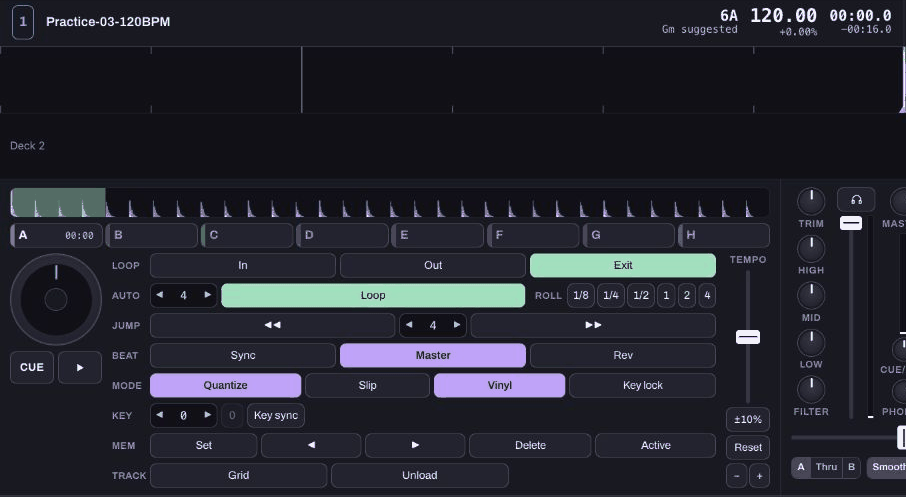
Before choosing another loop, return to the place you actually mean. Moving to a cue and leaving an earlier loop active are separate actions. Check the highlighted range rather than assuming it moved with your attention.
3. Try a held roll separately
Turn the ordinary loop off first and return to the cue. Start playback, then hold the 2 control in ROLL. Release it after a few beats. The brief repeated sound is the roll; on release the track continues where it would have been without that interruption.
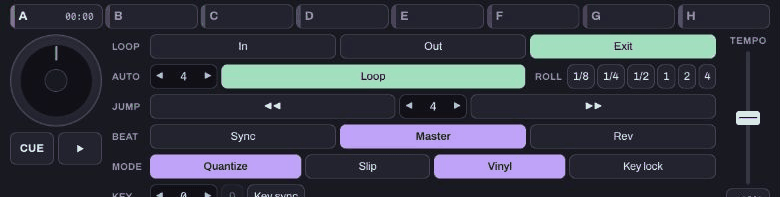
In the isolated test, a three-second held roll released into the later track position, rather than leaving the playhead stuck at the start. That checks the intended return behaviour for this example. It is not a latency measurement or a claim about a hardware pad.
4. Move four beats with beat jump
Stop playback, leave looping off and return to the cue. Set the JUMP size to 4, then press the forward jump arrow once. Our 120 BPM test moved from 00:00.0 to 00:02.0. The back arrow moves the same number of beats in the other direction when there is room to move.
A jump is a move, not a repeat. On a different tempo its duration in seconds changes. If a normal loop is active, beat jump moves the loop as well, so keep it off while first learning the difference.
5. Explain what you noticed
Try to finish three sentences: “The ordinary loop kept repeating…”, “When I released the roll…”, and “One four-beat jump moved…”. If the behaviour surprises you, stop and check the active loop, selected deck and jump size before trying another control.
Keep this exercise on one familiar track. Add a second track only when you can return to your cue and leave a loop deliberately. This guide does not cover scratching, reverse, Slip mode or a complete live set.