A listening practice story
You can see the next change. Can you hear it coming?
You have grown comfortable mixing with a large waveform display. On a different screen, you suddenly feel lost. You know the music, but watching the bars has become part of how you decide when to bring in another track.
Practise with one familiar track, one short passage and one predicted change. In Hearhood's DJ area, play your own music file, listen for a change, note its time and return to the passage. On a computer you can mark useful positions with hot cues. The compact layout supports one-track listening rather than two-deck mixing.
This is ear practice, not automatic phrase analysis. Hearhood does not judge whether your prediction was right or guarantee that two tracks will blend. No controller, account or AI access is needed for the listening exercise.
1. Choose one track you already know
Use a music file you are entitled to use. You do not need to buy a new collection for this exercise. A track you made yourself works too, provided it has a change you can listen for.
Open Workspace › DJ. Press Add files and choose the file from your device. On a computer, load it on deck 1 from the library. In the compact layout, select the track in the library and use the player at the top.
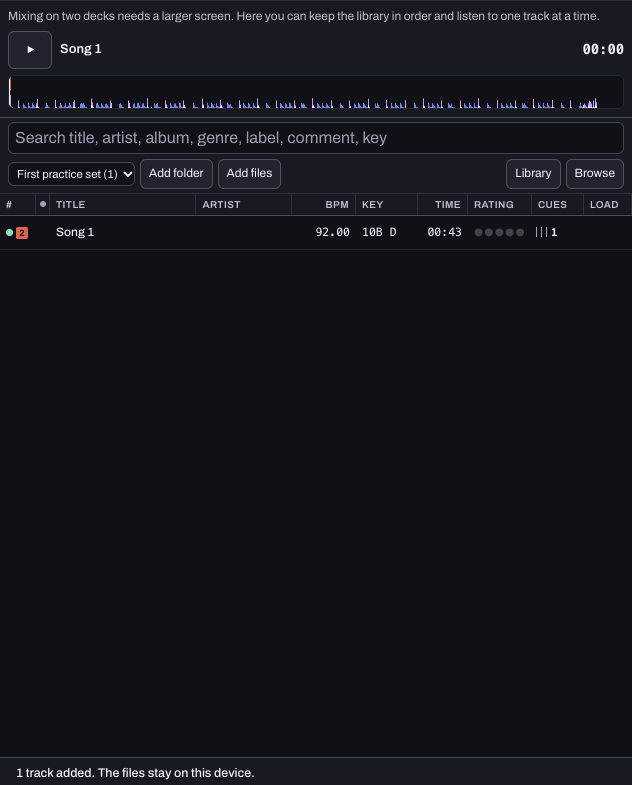
Hearhood does not connect to commercial streaming catalogues in this beta. Adding a file is not importing a streaming playlist, and it does not grant rights to publish a mix. This exercise stays with your local file.
2. Listen once without counting
Play a short passage. Notice what changes: drums enter, a vocal finishes, the bass disappears, or a section becomes quieter. A musical phrase is a group of bars that feels like a unit or thought. A phrase boundary may have a clear change, but it is not always a dramatic drop.
Pick one change you can recognise. Write down its approximate playback time outside the app. Do not try to label the entire song yet.
Keep the volume comfortable. You are listening for arrangement and timing, not trying to make the track sound more exciting by turning it up.
3. Replay and predict the change
Move the playback position to a little before your note. In the compact layout, use the position slider. On a computer, use the deck waveform to return to the passage. Listen again and try to anticipate the change without watching the display continuously.
Say “now” or tap when you expect it. Then compare with what actually happens. If you were early or late, return to the same passage and ask what sound led you to expect the change.
For a straightforward 4/4 track, you can count four beats to a bar. Count bars across the passage if that helps, but do not assume every track changes after exactly eight or sixteen bars. An extra bar, a pickup or a deliberately unusual structure can change the pattern.
4. Mark the useful place, then listen again
On a computer, stop deck 1 at the position you want to remember and press an unused hot cue, such as A. Pressing that cue again returns to the saved position. The practice-set guide shows a cue on a loaded deck.
In the compact layout, keep your timestamp note and return using the position slider. Do not look for the desktop hot cue controls on this screen.
A cue is a bookmark, not an explanation. Write why you marked it: “vocal ends here” is more useful than “good bit.” Keep the original music file and check the saving guide before clearing browser storage or moving devices.
5. Bring the lesson into one transition
When you can recognise the change by ear, use a computer and try bringing a second track in around it. The first-transition guide covers the deck and mixer controls. Keep the same pair of tracks for a few attempts so you can compare the timing.
Ask whether the incoming part supports the outgoing one. Overlapping vocals may feel crowded. Removing a bass part may create space, or the new track may change the mood more sharply than you want. These are listening choices, not a score determined by matching BPM alone.
Stop with one observation: what signalled the change, where you tried the join and what you would adjust next. You have made progress if you can explain what you heard, even if you decide that another track would fit better.