A beginner DJ route with one join at a time
Start with two tracks you are entitled to use, a small practice goal and a way to stop and compare. This route connects the existing courses and DJ guides. It does not require buying a controller or promise compatibility with a particular device.
For the full two-deck guide layout, use a computer. A phone layout differs. Short-course exercises are separate simulations; they do not operate your decks or change a music library.
Stage 1: hear and count a phrase
Read count beats and bars and hear DJ phrase changes. Choose one familiar passage, count four steady beats, then notice how groups repeat. Try predicting a change and checking it by listening again. Do not assume every genre follows identical phrase lengths.
Keep: one place you expected a change and what you actually noticed.
Stage 2: practise a simple handover
In Short courses, find Try your first DJ blend. Then follow your first transition with your own permitted practice files. Matching a number labelled BPM is only part of lining up music: beat position and the point in the phrase matter too.
Keep: one clear description of the join. Stop and try again instead of making several speed and effect changes together.
Stage 3: prepare a small set
Use prepare your first DJ set and plan hot and memory cues. Choose a few tracks for a reason, mark useful points and rehearse one join. A cue marks a place; it does not decide when the best musical transition should happen.
Keep: a shortlist and a reason for the order. Your library information is separate from the music files.
Stage 4: compare one effect or extra layer
Try Hear a tone change before adding effects, then read use DJ effects. Compare a small change with the unchanged passage. Return to the starting setting before trying the next idea. Leave sampler, stems or more decks for a separate task when they serve your goal.
Understand the practice view
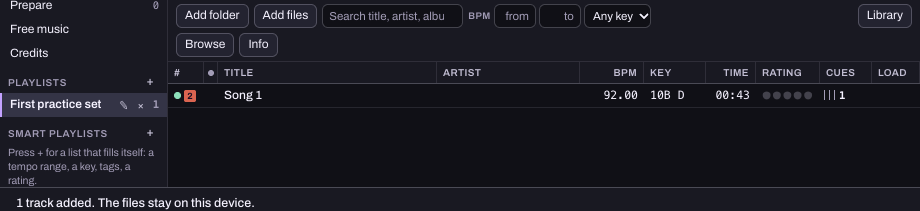
This existing reference capture shows a practice playlist. It is not a licensed commercial-song catalogue. The guide does not connect Spotify or Apple Music for mixing, and an external event playlist link is a separate listening link.
Keep your setup and next step clear
For private headphone listening, read headphone cueing and check the requirements of the actual output route. If you own a controller, use the controller check rather than assuming support from a demonstration.
Young learners must follow current family access rules. Under-13 accounts are unavailable. The parent plans provide offline rhythm and listening ideas without an account.
About this route
Prepared for Hearhood by Scopra with AI assistance. The linked controls and published course titles were checked on 25 October 2026. No new hardware compatibility, audio-performance result or learner outcome is claimed.