Hearhood vs Suno: build the parts or begin with generation?
Hearhood is a useful Suno alternative when your goal is to practise building and changing musical parts yourself. Suno is worth investigating when you want a generated musical performance from an idea or your lyrics. Suno also has editing tools, so the choice is about your starting task rather than a simple editable-versus-uneditable split.
Start with a musical decision in Hearhood
In Hearhood, you can begin with a drum pattern and change where the hits fall. Then add a bass idea, adjust notes or give the loop a second section. The first-beat lesson and loop-to-song exercise focus on changes you can describe and hear.
The creative tools open without an account. Optional AI guidance has separate access and availability requirements. The assistant is support for your work; Hearhood does not claim to generate a finished sung performance from pasted lyrics.
This is a reason to choose Hearhood when the goal is a small practical learning task. It is not evidence that one product produces better learning outcomes for everyone.
Build a first beat in Hearhood
Start with a tune you can hum
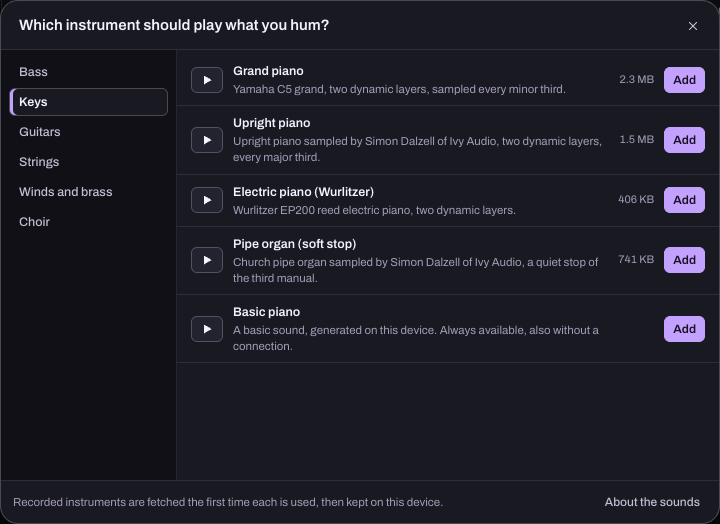
In Hearhood's Songwriter workspace, Hum a part turns a short hummed phrase into editable notes for an instrument. Choose the sound, correct the notes that need it and add chords, drums or your voice. The humming-to-song walkthrough follows that process.
Start with lyrics in either workflow
Suno's Custom-mode guide explains how to supply your own lyrics during song creation. That can be useful when the result you want is a generated interpretation of your words.
Hearhood's lyric route begins differently: write a verse and chorus, then use the song-starting exercise to develop an editable sketch. You choose how to shape the idea rather than asking this workflow to perform the whole song for you.
Try one short verse first. Decide whether today's question is “what could these words sound like performed?” or “how do I build the rhythm and backing under these words?” Those are both useful questions, with different starting workflows.
Suno also supports musical editing
It would be misleading to describe Suno as only a prompt box with no editing. Its current Studio 2.0 documentation describes MIDI, a piano-roll note editor and stem workflows. The MIDI guide explains note editing in Studio.
Check the current Suno plans for access to the specific tools you need. We have not tested its authenticated Studio workflow here or compared it feature by feature with Hearhood.
Hearhood's practical advantage for this exercise is a direct, account-free starting point for editing a beat with linked beginner lessons. Its beta is not presented as a substitute for every Suno generation or Studio feature.
Keep the kind of result you need
A listening file, editable note data and an app project preserve different things. Read audio, MIDI and project files before deciding that a downloaded song is also an editable backup.
In Hearhood, local projects are stored in the browser on this device. Signed-in account sync also keeps supported editable work without recorded takes or DJ audio files. Keep a checked export including recordings before clearing site data or relying on another device. Use the export guide for the current workspace options.
For Suno, check its current plan, download options and terms against your intended use. This comparison does not make a commercial-rights judgment or claim that every generated result has the same permissions.
Choose a first task
- Learn why a beat changes: try Hearhood's drum exercise and alter one part at a time.
- Develop a lyric through your own musical choices: use Hearhood's linked writing and song-sketch guides.
- Hear a generated interpretation: investigate Suno's documented creation workflow.
- Explore Suno's note or stem editing: check Studio access and the current official documentation.
Sources and check method
The linked official product documentation was rechecked on 24 October 2026. Public signup and interface observations described below are from the earlier 21 October check; we did not run a new authenticated session.
Written by Scopra, Hearhood's operator. Reviewed 21 October 2026 using the linked official Suno documentation and Hearhood's observed account-free creative-tool entry. This is a workflow comparison, not a generation-quality, latency or teaching-outcome benchmark. No authenticated Suno generation or Studio session was run.