Hearhood vs DJMixer.online: what do you want to practise?
Choose Hearhood when you want a guided route from a first transition into set preparation, cues and wider music-making. DJMixer.online is an option for opening a focused two-deck browser mixer. Both let you reach mixer controls without creating an account, so signup is not the deciding difference.
What we found on the mixer screens
In our computer check, DJMixer.online's mixer opened with two empty decks, load and play controls, sync, cue, volume, filters and a crossfader. Its homepage describes local-file mixing and says the workflow is live, without export or rendering.
Hearhood's v41 DJ workspace opened with a start panel, track library and mixer. Visible controls included hot cues, loops, a Prepare list and a Rec control described as recording the master mix to WAV on the device. These are observations of the interface, not a side-by-side test of playback or export quality.
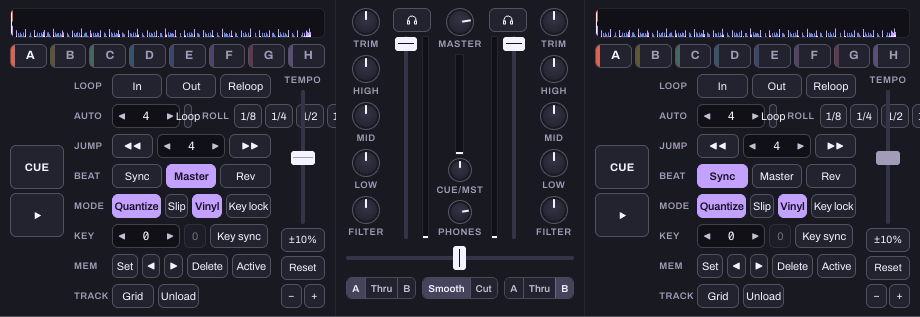
A focused blend or a structured practice session?
For one simple blend, DJMixer.online presents the main deck controls in a focused interface. It also publishes beginner articles; this is not a claim that it has no learning resources.
Hearhood connects its workspace to exercises with a defined listening goal. The first-transition guide begins with loading tracks and controlling the overlap. The phrase-change exercise then focuses on predicting changes in one track. The set-preparation lesson helps turn a library into a shortlist you can rehearse.
That connected practice path is a reason to choose Hearhood if you want to work through those tasks in one place. More visible controls are not automatically easier, so start with two decks and one goal.
Follow Hearhood's first transition
Keeping a practice result
Hearhood exposes a master-mix recording control. Its export guide explains that a DJ recording is a listening WAV, not an editable history of every transition or a backup of the library. Listen back and note one thing to change next time.
DJMixer.online's homepage describes live mixing without export. If keeping a mix inside the same tool is essential, verify the current recording workflow before beginning a long session. We did not benchmark recording in either tool in this comparison.
Going beyond mixing existing tracks
Hearhood also has Produce and Songwriter workspaces. You can build a drum pattern or start from lyrics alongside your DJ practice. Making an original beat and mixing finished recordings are different tasks, but exploring both can help you understand how musical parts fit together.
This is a broader workflow reason to consider Hearhood. It does not establish that Hearhood's mixer sounds better or that either browser tool replaces your specific controller and desktop-software setup.
Try this decision exercise
Choose two compatible music files you are authorised to use. Practise a short crossfade and focus on the volume overlap. For a fair playback comparison, use the same files and output setup in both tools. Then decide whether you want a focused mixer or Hearhood's library, practice path and additional creative workspaces.
Do not treat matched BPM as proof of aligned beats. Use the counting lesson to develop your listening separately.
Sources and check method
The linked official product documentation was rechecked on 24 October 2026. Public signup and interface observations described below are from the earlier 21 October check; we did not run a new authenticated session.
Written by Scopra, Hearhood's operator. Checked 21 October 2026: both public mixer entry routes and their visible computer controls; DJMixer.online's linked homepage supplies its feature descriptions. No audio files were loaded in this check. Playback, sync accuracy, recording fidelity, controllers and mobile layouts were not benchmarked.