A beginner route from one beat to a small finished idea
Start with a small result you can explain: a beat, a quieter supporting part, a contrasting section and a checked export. These are four practice stages, not a promise of a polished production in four lessons. Repeat any stage when it is useful.
This route points to the existing app courses and full guides. The short courses use a separate practice space; completing one does not change your song. Try the real controls in a duplicate or disposable project when you are ready.
Stage 1: make a pattern you can recognise
Open the app, choose Short courses and find Make your first beat. Try a pulse and backbeat in the practice space. Then use the beat guide for a separate project. Keep a four-count description of the pattern, not a claim that one pattern suits every style.
Ready to move on? You can show where a sound happens and where you left space. If you want more practice, change one sound position while keeping the tempo.
Stage 2: give the parts different jobs
Try Make room in your mix, then mix your first song. Choose one part to follow and one part to support it. Compare a quieter support part at the same listening level rather than adding several effects at once.
Keep: a note of which part you changed and why. The practice slider target is not a universal mix setting.
Stage 3: give the loop a second section
Try Turn a loop into a song and read the arrangement guide. Keep the first section, make a second section and change one detail in the new section. Check the guide's unlinking step so an edit meant for one section does not alter the other.
Keep: both the starting idea and the version with the contrast. A labelled section is a way to organise an idea, not a guarantee of musical variety.
Stage 4: check the file you will keep
Use save and export to distinguish a listening file from an editable project. Play a short export and check it contains the parts you intended. Keep the editable project too. Do not clear the original until you have checked your copies.
One screen at a time
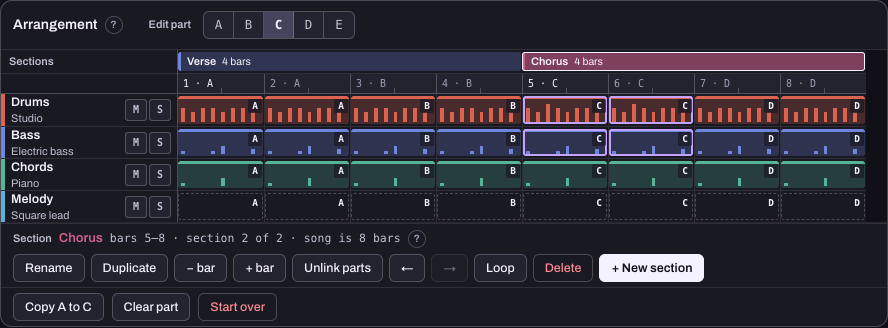
This existing reference capture shows a section contrast in the app. It is not your project and completing a course does not create this arrangement. If your screen differs, use the linked guide and check your workspace.
Choose the next question
Ask “What stops this idea working for me?” Choose timing, sound, arrangement or file handling, then use one related guide. More tracks and louder playback are not automatic improvements. The learning route hub helps you choose another focus.
For young learners, check family access before app use. Under-13 accounts are unavailable; the parent plans offer offline activities.
About this route
Prepared for Hearhood by Scopra with AI assistance. Course titles and guide links were checked against the published catalogue on 25 October 2026. This route is editorial guidance, not a qualification or an assessment of listening ability.