Could piano and keyboard be a good next music interest?
Explore a repeating pattern of low and high notes before deciding whether to try physical keyboard lessons. This guide helps a parent and learner explore an interest without buying equipment first. It does not prescribe an instrument for an age or promise that one choice will be easiest.
What to listen or look for
A keyboard puts pitches in a visible sequence. An acoustic piano makes sound with hammers and strings; a digital keyboard produces sound electronically. A screen note editor can illustrate note order but does not reproduce key weight or teach hand technique.
Try one idea without an instrument
Draw three boxes labelled low, middle and high. Choose an order such as low-middle-high-middle. An adult can hum a comfortable version while the learner points to the boxes. Change only the last choice and compare. This is a pitch-shape activity, not practice at a physical piano.
Ask: Do you enjoy choosing a tune one note at a time, or hearing several notes together? Let the learner choose whether to repeat, change the idea or try a different instrument role. An adult can write down the answer; no account, recording or public performance is needed.
Take a useful question to an introductory lesson
Ask how an introductory lesson will demonstrate a comfortable setup and hand movement. Discuss instrument access, space, sound options and what practice between lessons would involve. Have a teacher assess the actual setup rather than selecting by an age label alone.
Keep your question concrete: “Can we try one small musical task and talk about what the learner noticed?” An introductory conversation can help you understand the next step without treating a short activity as a talent assessment. This page does not recommend a particular teacher, retailer or model.
Where a screen example can help
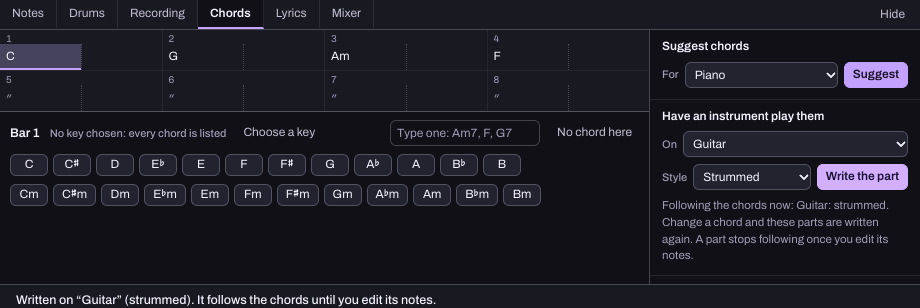
This reused Hearhood capture shows an optional musical planning tool for an adult or otherwise eligible learner. It is not a photograph of an instrument lesson or evidence of a child using the app. For a separate screen activity, read Use a MIDI keyboard with Songwriter. Check the family access guide before any child app use; under-13 accounts are unavailable.
A piano-like sound on screen does not make a device equivalent to a physical piano. A MIDI keyboard sends note instructions; it is not an audio recording or a complete instrument lesson.
A note you can keep
Write three short answers: “The sound or role we liked was…”, “The task we want to try with guidance is…”, and “The question we still have is…”. Keep it private if you prefer. A different answer next week is welcome.
Sources and scope
Prepared for Hearhood by Scopra with AI assistance. Instrument background: Yamaha: acoustic and digital sound production. The offline exploration task is an original editorial suggestion, not a reproduced manufacturer lesson or tested learner result. Physical instrument technique needs appropriate individual guidance.